Introduction
Are you choosing the right cloud for Databricks or unknowingly investing in the limitations of your entire data platform? Data management is undergoing a major shift, from traditional architectures (where data lakes and warehouses exist separately) to lakehouse models (which combine them into a unified architecture). Data volumes, limitations of traditional data warehouses, and the increasing need for centralized cloud-based data management are the primary reasons for this growth. Databricks is emerging as the foundation for building scalable data ecosystems.
Databricks enables teams to unify data engineering, analytics, and machine learning workflows within a single platform, reducing complexity and accelerating insights. However, while Databricks provides a consistent experience, the cloud environment it runs on plays a critical role in how effectively it delivers value.
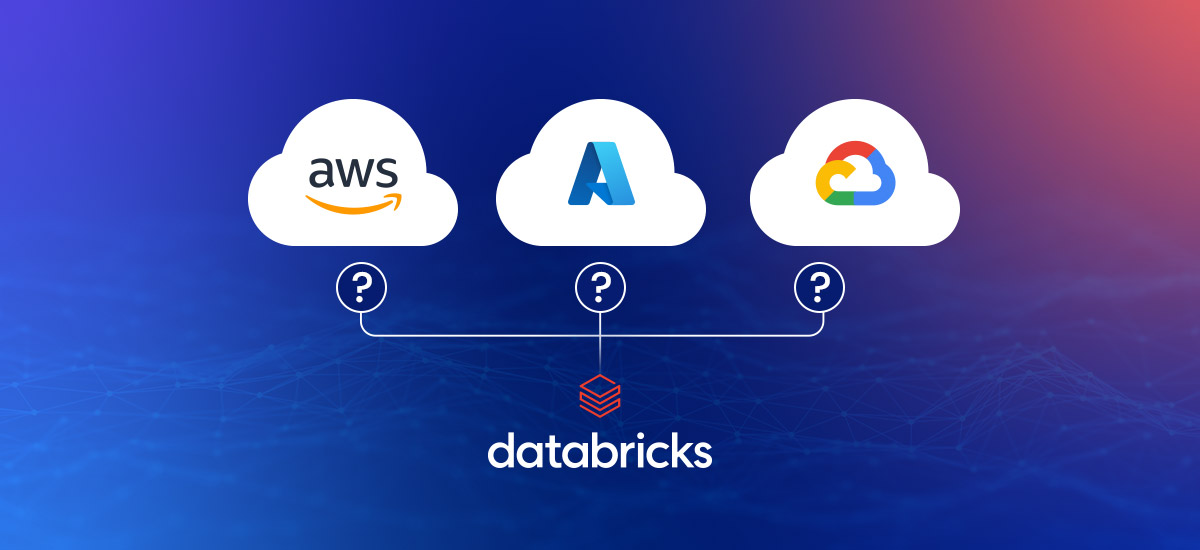
Choosing the wrong Cloud Platform may seem like a simple deployment decision, but it can quickly become a long-term architectural limitation. This write-up will help you to pick from the best top 3 clouds – AWS, Azure, and Google Cloud for your Databricks.
Databricks and the Modern Data Platform
Organizations are moving from traditional data warehouses to more flexible, scalable architectures, and Databricks is emerging as a central component in this transformation. Unlike legacy systems that have separate storage, processing, and analytics, Databricks simplifies the entire data lifecycle.
It allows organizations to ingest, process, analyze, and model data in one place, reducing complexity and improving collaboration across teams. This unified approach is especially valuable in data-driven environment, where businesses need faster insights and real-time decision-making.
Additionally, Databricks is built on open-source technologies like Apache Spark and Delta Lake, making it highly adaptable and widely adopted.
Databricks Data Engineering and Analytics Capabilities
Databricks offers a comprehensive platform that supports the full spectrum of data workloads, making it a preferred choice for both data engineers and analysts. Databricks enables scalable data processing with Apache Spark, enabling teams to efficiently handle large volumes of structured and unstructured data.
Data engineers can build robust ETL and ELT pipelines, automate workflows, and ensure data quality using features like Databricks Delta Lake.
Understanding the Lakehouse Architecture
Lakehouse architecture is a modern approach that combines the best features of data lakes and data warehouses into a single system. Databricks was one of the first platforms to introduce this concept to mainstream adoption.
Traditionally, data lakes were used for storing large volumes of raw data, while data warehouses were used for structured analytics. However, managing both systems often led to data duplication, increased costs, and operational complexity.
The lakehouse model addresses these challenges by providing:
- The scalability and flexibility of data lakes
- The reliability, performance, and governance of data warehouses
As a result, the lakehouse architecture simplifies data architecture, reduces costs, and enables real-time analytics, making it a preferred approach for modern data platforms.
Difference Between AWS vs Azure vs Google Cloud
| Features | AWS | Azure | Google Cloud |
| Primary Integration | S3, IAM, and Redshift | ADLS Gen2, Power BI, and Synapse | GCS, BigQuery, and Dataflow |
| Best For | Custom architectures and AWS-native teams | Microsoft-centric enterprises and BI-heavy workflows | AI/ML-focused workloads and cloud-native teams |
| Tooling Synergy | AWS Glue & SageMaker | Azure Data Factory & Azure ML | Vertex AI & Dataproc |
| Maturity | Highest; most established and widely adopted | High; seamless enterprise adoption | Emerging; rapidly growing with high-speed networking |
| Security/ID | Advanced IAM & Compliance | Azure AD (Entra ID) native integration | Infrastructure-level controls |
Confused Between AWS, Azure, and GCP for Databricks?
Get expert guidance tailored to your data architecture, performance, and cost requirements.
Contact Our Databricks ConsultantDatabricks Deployment Options Across Major Cloud Providers
Databricks is a multi-cloud data platform that allows you to deploy it across AWS, Azure, and Google Cloud without changing the core experience. While the platform’s core capabilities, such as Apache Spark processing, Delta Lake, and collaborative notebooks, remain consistent, the surrounding cloud ecosystem plays a significant role in shaping how teams build and scale their data platforms.
Each Cloud Platform has its own strengths in terms of storage ingestion, security, analytics services, and cost optimization, which directly impact Databricks’ implementation in real use cases. Here is how Databricks works on some very popular and commonly used cloud platforms:
Databricks on different cloud platforms
| Feature | Azure Databricks | Databricks on AWS | Databricks on Google Cloud |
| Partnership Model | First-party (Deep Microsoft integration) | Third-party (Most mature deployment) | Third-party (Modern & evolving) |
| Ideal For | Microsoft ecosystem, enterprise BI workflows | Large-scale data engineering, flexible architectures | AI/ML-driven workloads, advanced analytics |
| Storage Layer | Azure Data Lake (ADLS), Blob Storage | Amazon S3 | Google Cloud Storage (GCS) |
| Security & Identity | Azure Active Directory (Entra ID) | AWS IAM | Google Cloud IAM |
| Data Engineering | Data Factory, Synapse Analytics | AWS Glue, EMR, Athena | Dataflow, Dataproc |
| Analytics Integration | Power BI, Synapse | Redshift, QuickSight | BigQuery, Looker |
| ML Ecosystem | Azure ML, Cognitive Services | SageMaker | Vertex AI |
| Performance Strength | Enterprise integration & optimized workflows | Highly flexible and scalable infrastructure | High-performance networking & analytics |
| Cost Optimization | Benefits for Microsoft Enterprise Agreements | Flexible pricing (Reserved, Savings Plans) | Transparent pricing, sustained-use discounts |
| Best Use Case | Enterprise platforms with tight governance | Custom, large-scale, cloud-native pipelines | Data science, AI, and real-time analytics |
1. Databricks on AWS
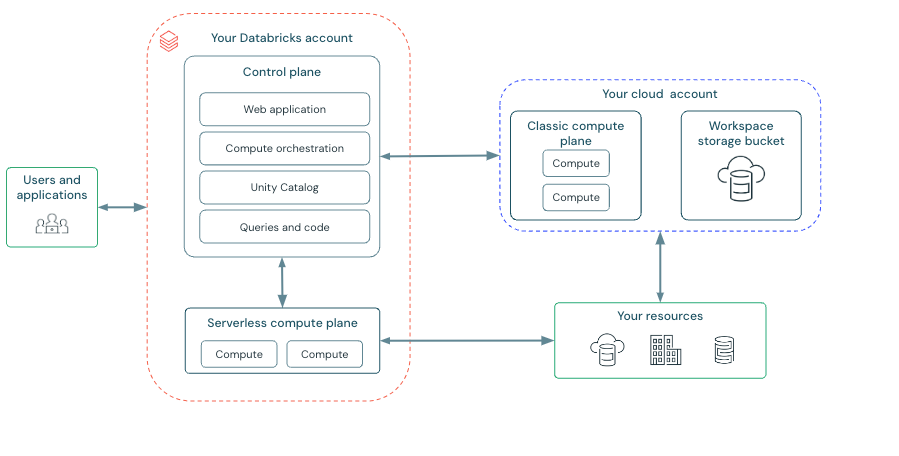
Databricks on AWS is the most widely adopted deployment mode, as AWS is the first cloud platform to support Databricks. The maturity of this model is reflected in its deep integration with AWS services and its flexibility in managing the large-scale data volume.
Source: Databricks
One of the key advantages of using Databricks on AWS is its seamless integration with Amazon S3, as it acts as a scalable and cost-effective storage layer. Other services like AWS IAM provide identity and access management, while other tools like Redshift and AWS Glue complement data engineering and analytics workflows.
When it comes to infrastructure configuration, AWS offers a high level of flexibility; businesses can fine-tune compute clusters, networking, and storage setups to meet specific workload requirements.
2. Databricks on Azure
Databricks on Azure stands out because of its deep integration with the Microsoft ecosystem, making it an ideal solution for enterprise environments. As Microsoft and Databricks have collaborated closely to optimize performance, security, and usability, it has become a first-party service on Azure.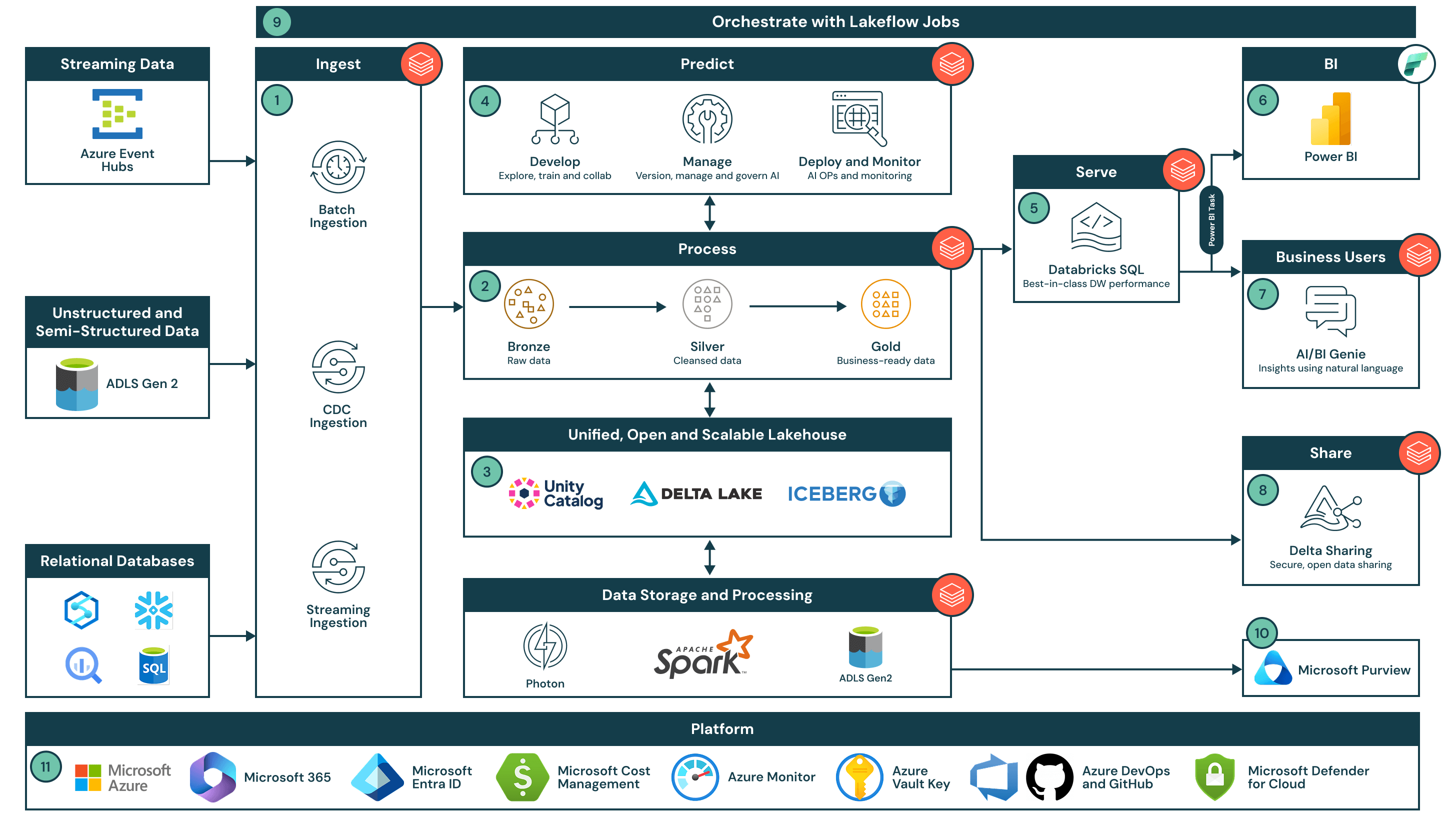
Source: Databricks
Databricks integrates well with Azure Data Lake Storage (ADLS), providing a reliable, scalable foundation for storing data. Azure Databricks integrates naturally with services like Azure Synapse Analytics, Azure Data Factory, and Power BI, enabling organizations to build end-to-end data pipelines and visualization workflows with minimal effort.
Azure’s enterprise-grade identity and governance capabilities through Azure Active Directory simplify user management, access control, and compliance, especially for organizations operating in regulated industries.
| Recommended Read: Azure Integration Services: The Complete Enterprise Guide |
3. Databricks on Google Cloud
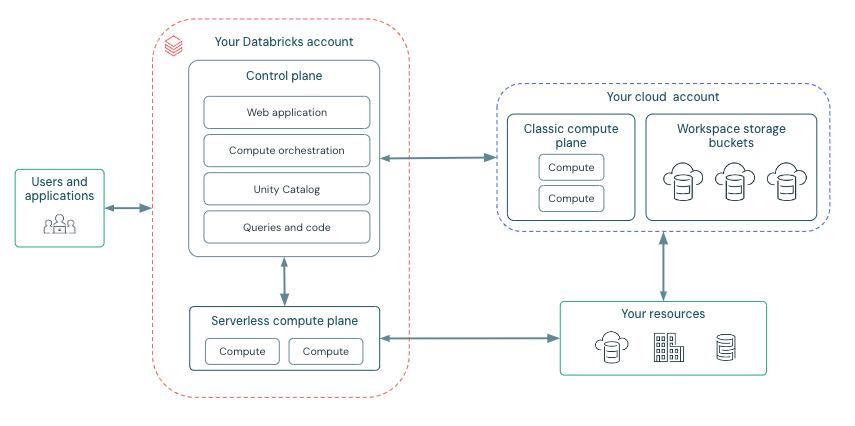
Google Cloud and Databricks create a powerful solution by using Google’s expertise in data analytics, machine learning, and high-performance infrastructure. While it is relatively newer compared to AWS and Azure deployments, it has quickly gained traction among data-driven organizations.
Source: Databricks
A major advantage of this setup is its integration with Google Cloud Storage (GCS) and analytics tools like BigQuery. This allows organizations to design efficient data pipelines that leverage both Databricks for processing and BigQuery for fast querying and analysis.
Google Cloud’s AI and Machine Learning capabilities make it an attractive option for teams that are heavily focused on advanced analytics.
Key Factors When Choosing a Cloud for Databricks
Choosing the right cloud for Databricks is not just about technical understanding; it is a strategic move that may shape the long-term success of your data platform. Here are a few things all businesses should keep in mind while choosing a cloud platform for Databricks:
1. Integration with Existing Cloud Ecosystem
The primary factor is how well Databricks fits into your existing cloud environment. For instance, a company using AWS services (S3, IAM, or Redshift) finds it more efficient to deploy Databricks on AWS. Similarly, any organization that is built around Microsoft technologies must choose Azure Databricks for its seamless integration with other Azure services.
Choosing a cloud that aligns with your current ecosystem reduces integration complexity, minimizes data movement, and improves overall operational efficiency.
2. Compatibility with Storage and Data Services
Databricks relies heavily on cloud storage as its foundation, making storage compatibility a critical factor. All three cloud platforms are highly scalable; however, their integration depth with other services may vary.
Organizations must focus on how Databricks integrates with data warehousing and analytics tools such as Redshift, Synapse, and BigQuery. A well-aligned storage and analytics ecosystem can significantly simplify data pipelines and improve performance.
3. Scalability and Performance for Data Workloads
Databricks is designed for large-scale data processing, so the underlying cloud infrastructure must support high-performance workloads. Factors such as compute capabilities, network performance, and storage throughput can all impact how efficiently data pipelines run.
Ultimately, the best choice depends on the type of workloads you run, whether it’s batch processing, real-time streaming, or machine learning pipelines.
4. Cost Structure and Resource Management
While Databricks pricing is generally consistent, the underlying cloud costs, such as compute, storage, and data transfer, vary significantly. Efficient resource management, such as using autoscaling clusters and optimizing job scheduling, plays a critical role in controlling costs regardless of the cloud platform.
Organizations should evaluate not just pricing, but also how easy it is to monitor and optimize usage.
5. Security Compliance Capabilities
Security and governance are essential for any data platform. Organizations must ensure that both the cloud provider and Databricks capabilities align with their compliance requirements and internal security policies.
When to Choose AWS vs Azure vs GCP?
| When Your Priority Is | Choose AWS | Choose Azure | Choose Google Cloud |
| Existing Ecosystem | Your infrastructure is already AWS-First (S3, EC2, IAM). | You are a Microsoft Shop (Office 365, Teams, Active Directory). | You are a “Data-Driven Startup” or use Google’s AI tools (Vertex AI). |
| Technical Control | You need fine-grained control over infrastructure and networking. | You want a turnkey, first-party service (Azure Databricks is natively managed). | You want cloud-native simplicity and better Kubernetes (GKE) support. |
| Business Intelligence | You use specialized tools like Tableau or AWS QuickSight. | Power BI is your primary reporting tool (the integration is seamless). | Looker is your main BI tool, or you need BigQuery’s speed. |
| Data Strategy | You have massive, complex data pipelines and need high maturity. | You require strong governance and strict enterprise compliance. | You focus on advanced AI, ML, and rapid model prototyping. |
| Budget & Billing | You have large AWS spend commitments to burn through. | Unified billing with Databricks appearing on a single Microsoft invoice. | You want simpler pricing (like automatic sustained-use discounts). |
Best Practices for Managing Databricks Across Multiple Clouds
Managing Databricks across multiple clouds requires a practical approach to gain scalability and reduce vendor dependency. Databricks may be a powerful combination with each of these cloud platforms, but then multi-cloud environments can introduce additional complexity.
1. Standardize Data Architecture and Workflows
Use standardized data formats like Delta Lake, consistent naming conventions, and unified pipeline designs to maintain data architecture consistency across all cloud platforms. Avoid rework and ensure the data pipelines behave similarly across cloud environments.
2. Leverage Cloud-Native Storage Efficiently
Each cloud platform has its own storage solution, like S3, ADLS, and GCS, and Databricks can easily be integrated with all of them. Instead of a one-size-fits-all approach, organizations should optimize storage usage within each cloud while maintaining logical consistency at the data layer.
3. Implement Centralized Governance and Access Control
Security and governance across multiple clouds can quickly become challenging. To address this, organizations must establish a centralized governance policy (role-based access controls, standardize authentication mechanisms) that applies across Databricks environments.
4. Optimize Cost and Resource Usage Across Clouds
Databricks on a multi-cloud setup increases the visibility challenges around cost. Each cloud has its own pricing model, which makes it essential to consistently check and optimize resource usage. Use autoscaling clusters to match workload demand,schedule jobs efficiently to avoid idle compute costs, and monitor usage patterns across environments.
5. Minimize Data Movement Between Clouds
Data transfer between different clouds introduces latency and additional costs. Organizations should design architectures that keep data processing close to where the data resides by running workloads in the same cloud where the data is stored. Also, avoid frequent cross-cloud data transfers and use replication only when required.
How NeosAlpha helps you choose the Right Cloud for Databricks?
With 8+ years of experience working across AWS, Azure, and Google Cloud, NeosAlpha brings a practical, hands-on approach to helping organizations choose the right cloud for their Databricks workloads.
As a Databricks partner, we understand that this decision is not just about technology; it’s about aligning your data platform with your business goals, existing ecosystem, and future scalability needs.
Our approach starts with a deep assessment of your current data architecture, workflows, and cloud investments. Whether you are already operating in a single cloud or exploring a multi-cloud strategy, we evaluate how Databricks can integrate seamlessly into your environment while minimizing complexity and cost.
Conclusion
Choosing the best Cloud for Databricks is ultimately all about the alignment and not superiority. While all three cloud platforms, AWS, Azure, and GCP, provide powerful environments for running Databricks, factors such as integration, performance, cost, security, and developer experience influence the overall effectiveness of your Databricks deployment.
To overcome challenges like performance bottlenecks, rising costs, and fragmented data pipelines, organizations should focus on selecting a cloud that aligns closely with their existing ecosystem and workload requirements. In many cases, the most practical approach is to build on the cloud they are already invested in, reducing complexity and improving operational efficiency.
In the end, there is no one-size-fits-all answer. The right decision is the one that simplifies your architecture, optimizes costs, and supports your data and AI ambitions over the long term. If you are still not sure which cloud platform is right for you, contact our data experts.