Introduction
The hard part of enterprise AI is no longer the model. It is what the model is allowed to touch.
Ask any IT leader running an agent pilot, and you will hear a version of the same story. The demo worked. The agent summarized the tickets, drafted the response, and retrieved the correct account record. Then the security review started, and the questions had no good answers. Whose credentials did the agent use? What stopped it from reading records the requester was never entitled to see? Where is the log that shows what it did? Who approved the tool it called, and who can revoke it?
That gap is why so many agent projects stall between prototype and production. Building an agent that can reason is now routine. Building one that can act inside a regulated enterprise, using the right identity, against the right systems, with a defensible audit trail, is a different problem entirely. It is an access and governance problem, and it belongs to integration architecture rather than data science.
The answer is Workato Enterprise MCP, a governed layer that lets AI agents discover and invoke enterprise capabilities via the Model Context Protocol, while identity, permissions, rate limits, and logging remain under central control. This article looks at what that actually involves, where it fits alongside integration investments you already made, and what your architecture review will want to see before any of it reaches production.
What the Model Context Protocol Actually Solves
Model Context Protocol (MCP) is an open standard, originally proposed by Anthropic, that defines how AI models and agents connect to external tools and data sources. It follows a client-server pattern. Agents act as clients, MCP servers expose tools, and the protocol handles discovery and invocation.
The value is standardization. Before MCP, connecting an agent to a business system meant a bespoke wrapper for every combination of model, tool, and system. Each new system meant new code. With MCP, an agent connects to a server, requests the available tool inventory at runtime, receives schemas and descriptions, and decides which tools to use based on the goal it was given. This is called dynamic discovery, and it means servers can evolve without breaking the clients that use them.
That runtime flexibility is exactly what makes the protocol useful and exactly what makes it risky without controls. An agent that can discover tools at runtime can discover the wrong ones. An agent acting on a service account can do anything that service account can do, on behalf of anyone who asks it. The protocol defines what is possible. It does not, on its own, define what is safe.
Why Access Is Harder Than Intelligence
Consider a request that sounds trivial: “Show me the last five support tickets for this customer and the most recent internal comment on each.”
For a human, entitlement is handled invisibly. The support agent logs in as themselves, and the ticketing system shows them what their role permits. For an AI agent, none of that is automatic. Somebody has to decide which identity the call runs under. If the answer is a shared service token, the agent can retrieve tickets for any customer and any requester, and no downstream system can distinguish a legitimate query from an unauthorized one. The permissions model that took years to build in Salesforce, Jira, or Workday is bypassed precisely when it matters most.
Multiply that by every team that spins up its own MCP server, and a second problem appears. Independent security research through 2025 and 2026 has repeatedly flagged the same pattern: servers deployed outside formal governance, credentials scattered across environments, and audit blind spots that make incident reconstruction difficult. OWASP’s MCP Top 10 project now formalizes threat categories that security teams test against, including tool poisoning, in which instructions are hidden in tool metadata that the model reads but the user never sees, as well as schema poisoning, tool shadowing, and shadow servers.
This is the argument for a gateway. Not because individual servers are inherently unsafe, but because scattered ones cannot be governed consistently.
| Recommended Read – ACP vs MCP vs A2A: The Complete Guide to AI Agent Protocols |
Inside Workato Enterprise MCP
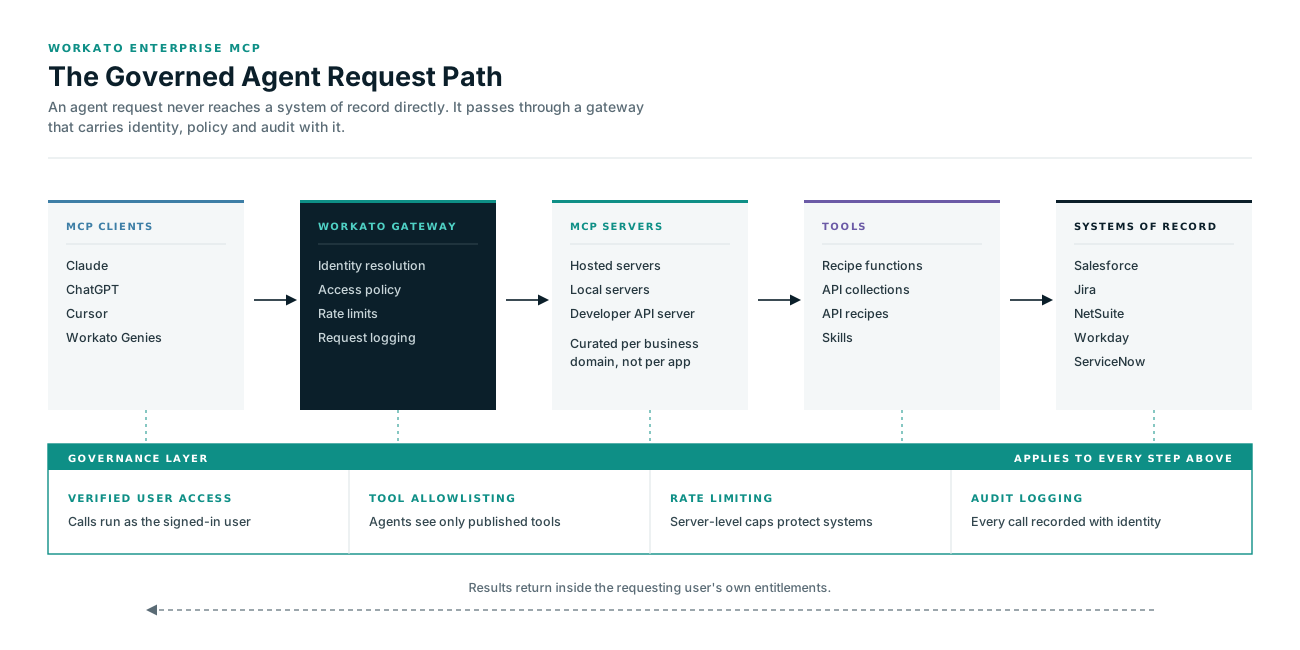
Workato Enterprise MCP is built as that governed layer. Rather than treating MCP as a feature bolted onto an integration platform, it uses the platform’s existing connectivity, identity, and audit machinery as the control plane for agent access.
| Capability | What It Does | Why It Matters |
|---|---|---|
| Verified User Access | Agent actions inherit the authenticated user’s identity rather than a shared token | Existing role-based permissions in source systems continue to apply |
| Unified Gateway Control | Publish, manage, and govern every MCP server from one console | Consistent policy without per-agent configuration |
| Universal Agent Compatibility | Works with Claude, ChatGPT, Cursor, Workato Genies, and other MCP-compatible clients | No lock-in to a single model provider |
| Instant AI Enablement | Convert existing recipe functions, API collections, and skills into MCP tools without code | Reuses integration work already delivered |
| Rate Limiting | Server-level limits shared across all tools on that server | Protects downstream systems from runaway agent loops |
| Logging and Audit | Every request, response, and event logged with identity attached | Supports compliance reporting and incident investigation |
Servers are created and managed in AI Hub, and Workato offers three deployment shapes: hosted MCP servers that expose your API collections and recipe functions, local MCP servers for tools and data that must stay on your own infrastructure, and a Developer API MCP server that lets tools like Claude Desktop or Cursor manage your Workato workspace itself. Availability currently covers the US, EU, Australia, Japan, and Singapore data centers, with servers hosted in the US, EU, and APAC regions to respect data residency requirements. It is not available in the China data center.
Verified User Access and Why Identity Sits at the Center
Verified User Access (VUA) is the capability that most directly answers the security review. Instead of external API calls using a static token, they use the authenticated end user’s credentials.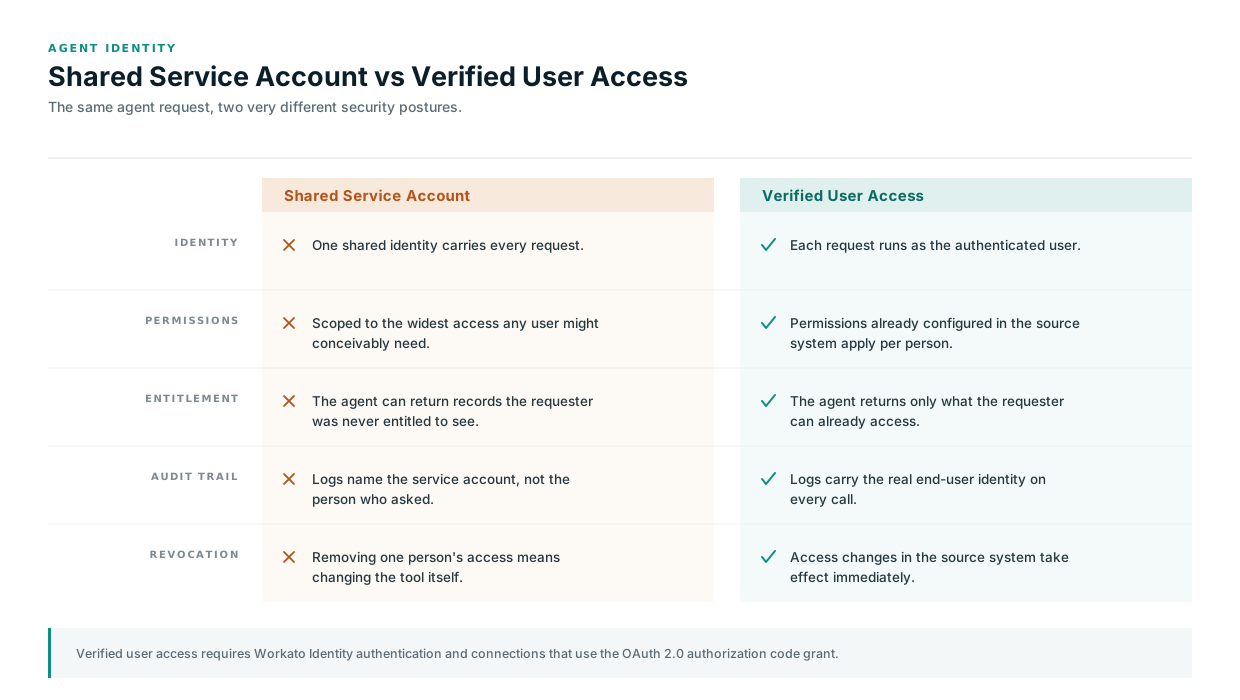
he flow works like this. A user connects through an MCP client. When a request requires a system the user has not yet authorized, the MCP server checks for a valid connection and, if it is missing or expired, returns an authentication prompt containing a Workato-generated setup link. The user signs in through Workato Identity, then completes OAuth consent for the target application, such as Jira or Salesforce. If several applications are involved, the user authorizes them one at a time. Once granted, those connections are stored against the user’s profile and reused across tools.
The result is that a Jira tool can only surface issues the requesting user can already see, and a Salesforce tool is limited to the accounts and opportunities assigned to them. Entitlement enforcement stays where it belongs, in the system of record.
There are constraints worth designing around rather than discovering late:
- VUA requires Workato Identity authentication. Token-based authentication does not support it.
- Only connections using the OAuth 2.0 authorization code grant are eligible for user-level connections.
- API recipes do not support VUA. Recipe functions and skills do.
- When a recipe is exposed as a tool, verified access applies only to the first-level parent recipe, so nested recipe functions need their connection types checked before they are exposed.
- Workspace owners, admins, and collaborators do not automatically receive MCP access. Every user, including yourself, has to be added to an end-user group.
That last point surprises teams during setup and is worth writing into your rollout runbook.
Talk to a Workato specialist.
NeosAlpha is a Workato partner helping enterprises design governed MCP architectures, expose existing integration assets as agent-ready tools, and build the controls that satisfy security review.
Schedule an appointmentFour Patterns for Putting Enterprise MCP to Work
Most enterprise use cases fall into one of four shapes, and they build on each other.
- Existing API assets become MCP servers: If your team already built API recipes, proxies, or collections for Salesforce, NetSuite, or ServiceNow, those can be exposed as MCP servers without rewriting the underlying logic. The functionality is identical. What changes is that any MCP-compatible client can now discover and invoke it. This is usually the fastest route to value because the integration work is already done and tested.
- The Workato Developer API becomes an MCP server: With the developer API exposed this way, engineers can manage recipes, projects, and environments through Claude, Cursor, Windsurf, or any compatible client. Access is bounded by the API token’s own permissions, so the same fine-grained controls that govern the workspace govern the agent. For teams already running a disciplined recipe lifecycle process, this extends existing governance rather than working around it.
- Genies act as MCP clients: Workato’s Genies can connect outward to third-party or customer-hosted MCP servers, invoking actions and retrieving data from the growing ecosystem of published servers without additional development, while still respecting the access policies defined for that Genie.
- Genies act as MCP servers: The reverse direction turns a Genie into a callable agent for external systems. A developer working in Cursor can ask an infrastructure Genie to run end-to-end tests or trigger a deployment. A marketing manager in Claude can reach a campaign Genie to pull performance reports or request assets. The orchestration logic stays inside Workato, governed and audited, while the point of interaction moves to wherever the user already works.The Questions Your Architecture Review Will Ask
Assume the review happens, and prepare for it. These are the questions that come up most often, and how a governed MCP layer answers them.
- Which identity does the action run under? With verified user access, the authenticated end user. Document which tools use VUA and which fall back to a builder connection, because that distinction determines the risk profile of each tool.
- What stops an agent from reaching systems outside its purpose? Tool allowlisting through curated servers, user group assignment, and access policies that route requests based on authenticated user context. Publish narrow, purpose-built servers rather than one server exposing everything.
- How is a compromised or poisoned tool detected? Tool descriptions and metadata are read by the model at runtime, which makes them an injection surface. Treat every tool definition as reviewed code, subject to the same change control as a recipe promoted to production.
- What happens when an agent loops? Server-level rate limits, shared across all tools on that server, cap the request volume reaching downstream applications.
- Can we reconstruct what happened? Every operation is logged with identity tracking, and logs can be fed into enterprise audit systems for centralized compliance reporting.
- Where is data processed and stored? Regional hosting and data residency constraints need confirming against your compliance obligations before the first production tool is published.
One more control belongs on this list even though it sits outside the platform: human approval for high-risk actions. Deletions, bulk record changes, financial transactions, and outbound communications should not be single-turn agent decisions. Design the checkpoint in deliberately.
Designing Tools That Agents Can Actually Use
A well-governed server with badly designed tools still produces poor outcomes. A few principles hold up consistently.
Keep each tool narrow and specific. “Search open tickets by customer” performs better than a general-purpose “query ticketing system” because the agent selects tools based on descriptions and schemas, and ambiguity can lead to incorrect choices.
Write descriptions for the model, not for a human reader. State what the tool does, what it needs, what it returns, and when it should not be used. Vague descriptions are the single most common cause of an agent picking the wrong tool.
Constrain inputs through schemas. Enumerated values and required fields reduce malformed calls and make failures easier to diagnose.
Group tools into business-centric servers. A composable server that covers the order-to-cash process is more useful to an agent than four separate servers organized by underlying application, because it matches how the work is actually described.
Version and promote tool definitions like any other production asset, through the same environments and approval gates as the rest of your automation estate.
A Rollout Sequence That Works
| Phase | Focus | Outcome |
|---|---|---|
| 1. Inventory | Catalog existing API collections, recipe functions, and skills; identify OAuth 2.0 authorization code grant connections | A shortlist of assets that can be exposed with minimal rework |
| 2. Contain | Publish one narrow server for one team, read-only tools first, VUA enabled | A working pattern with a limited blast radius |
| 3. Govern | Define user groups, rate limits, approval checkpoints, and log routing | Controls that satisfy security review before scale |
| 4. Expand | Add write actions with human checkpoints, compose business-centric servers | Agents that complete work rather than only retrieving information |
| 5. Operate | Monitor usage and errors, review tool definitions on a schedule, retire unused tools | A managed estate rather than accumulating sprawl |
Conclusion
The move from workflow automation to agentic automation is not a replacement. Deterministic recipes still handle the high-volume, well-defined processes that should never be left to a model’s judgment. What changes is that the same connectivity can now be reached two ways: through a recipe that runs on a schedule or trigger, and through a tool an agent invokes because a person asked for something in plain language.
Enterprise MCP is the governance layer that makes the second path viable in a regulated organization. Identity flows through, permissions hold, actions are logged, and the tools an agent can reach are the ones an administrator deliberately published. That is what separates an agent pilot from an agent capability.
The organizations getting this right are not the ones with the most sophisticated models. They are the ones that treated agent access as an integration architecture decision and applied the governance discipline they already use for APIs and automations.


