
- NeosReplay is an API virtualization accelerator that sits between an API layer and its backends, passing through, recording, or serving mocked responses.
- It operates in Proxy, Record, and Serve modes, switchable through an Admin API without redeployment or client configuration changes.
- Mocks can be generated from Swagger or OpenAPI specifications or captured from real traffic, and are tagged with an x-mock-response header.
- Mocks should be kept up to date and complemented by real integration testing and live measurements, since they cannot reliably measure real-world performance.
Your team is days away from a release when a third-party API starts timing out. The code hasn’t changed, but the build is failing, testing is stalled, and the delivery plan now depends on a system your team doesn’t control. For teams building connected applications, this disruption is familiar and costly.
Modern enterprise APIs rarely operate in isolation. A single service may depend on a core business system, a cloud data platform, external data providers, and internal services managed by different teams. Each dependency brings its own availability, rate limits, costs, and release schedule. The result is a delivery bottleneck: teams are accountable for progress but cannot control every system their work relies on.
NeosReplay, NeosAlpha’s API virtualization accelerator, helps remove that bottleneck. It sits between an API layer and its backends, where it can pass requests through to live systems, record real traffic, or return recorded and generated responses without calling the backend. Teams can create mocks from Swagger or OpenAPI specifications or capture them from real traffic, clearly identify mocked responses, and switch operating modes through an Admin API without redeploying.
The result is a more dependable way to develop and test APIs: teams can work in parallel, keep pipelines moving when dependencies are unavailable, and reduce unnecessary calls to metered services, while retaining a clear distinction between mocked behavior and real integration testing.
The Hidden Cost of Backend Dependencies
Backend dependencies slow delivery in several ways, and the effects often overlap.
- Work gets stuck in sequence – Front-end, mobile, and integration teams may all be ready to use an API before its provider has finished building it. Even when the contract is agreed, teams can be forced to wait or create temporary stubs that are difficult to maintain.
- Shared environments are unpredictable – Development and sandbox systems are regularly restarted, redeployed, or refreshed. When a shared environment becomes unavailable, every test suite and team that depends on it inherits the disruption. Repeated failures for reasons outside the codebase can also make build results harder to trust.
- Testing adds cost and pressure to rate limits – Commercial data providers and AI services may charge per request or enforce rate limits designed for production traffic, not for automated tests running on every commit. Teams may respond by reducing test frequency, weakening feedback when they need it most.
- Failures are difficult to reproduce – Testing an error scenario often depends on persuading a live backend to return a particular response. The unusual response that caused a production issue can be the hardest one to reproduce consistently, leaving a critical regression case without a reliable test.
What API Virtualization Changes
API virtualization replaces a dependency with a stand-in that behaves like the real thing at the protocol level. The client sends the same request to the same path with the same headers and receives a response of the same shape. Nothing in the application needs to know the difference, which is what makes the technique useful at enterprise scale.
This is not the same as the hand-written stub most teams already have somewhere in their repository. A stub is usually one developer’s quick, hard-coded approximation of one endpoint, written out of date within a release or two. It encodes what someone assumed the backend would return rather than what it actually returns, so it gives confidence without evidence. A virtualized service built from a real specification, or from recorded production-shaped traffic, carries the actual contract and payloads.
Introducing NeosReplay
NeosReplay is a proprietary accelerator developed within NeosAlpha’s API management practice, with Apigee-managed APIs as its primary context. Deployed in the request path between the API layer and backend systems, it provides a configurable way to control whether requests reach live services or are answered from a mock store.
Users create and manage virtual services through a user interface, while the Admin API lets them change operating modes. This configuration-led approach helps developers, testers, analysts, and delivery leads work with virtualized dependencies without building and maintaining custom mock code for every use case.
Three Modes, One Switch
NeosReplay operates in three modes. The same service can change behavior as the needs of a development or test environment change.
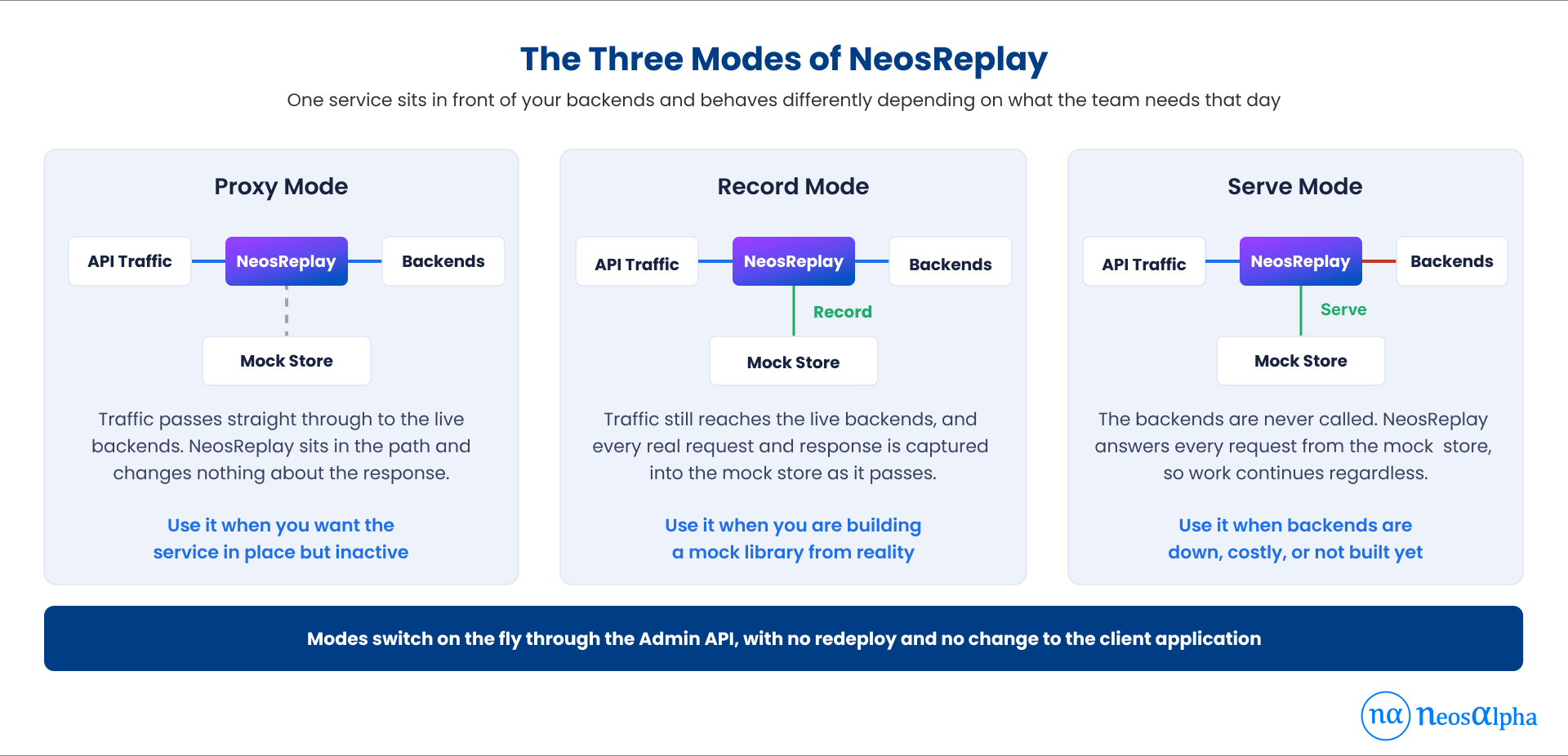
| Mode | What happens | When to use it |
| Proxy | Requests pass through to live backends. The mock store is not changed. | Keep traffic flowing through NeosReplay while preparing to activate virtualization when needed. |
| Record | Requests reach live backends, while the mock store captures real requests and responses. | Build a reusable library of realistic payloads, including response structures and error cases. |
| Serve | Responses are returned from the mock store; the backend is not called. | Continue development or testing when a backend is unavailable, expensive, rate-limited, or not yet built. |
The key operational advantage is the ability to switch modes dynamically through the Admin API, without a redeployment or client configuration change. If a shared sandbox becomes unavailable, a team can move the environment to Serve Mode and continue with previously captured responses. When the backend is available again, the team can return to Proxy Mode.
Record Mode can also run during normal use. Because requests still reach the live backend, teams can build a realistic mock library as traffic passes through, rather than arranging a separate recording exercise.
Want to see how NeosReplay could fit into your API delivery workflow?
Book a walkthrough with our experts.
Schedule a free appointmentTwo Ways to Build a Mock
NeosReplay creates virtual services from either of two starting points, and the right choice depends on what exists at the time.
1. Generate from an API specification
NeosReplay can generate a mock from a Swagger or OpenAPI document. This supports contract-first development: once the API contract is agreed, consumer teams can begin integrating even if the backend implementation isn’t ready. Working against the same specification can also surface misunderstandings about endpoints, fields, and response structures earlier in the delivery cycle.
2. Capture real traffic
In Record Mode, NeosReplay captures requests and responses as they pass through to live backends. The resulting mock library reflects actual payloads and response behavior, including details that an API specification may not fully describe, such as commonly populated optional fields or real error structures.
These approaches complement each other. Specification-based mocks can unblock early work; recorded traffic can later make testing more representative of the live service. Teams can use each approach when it offers the most value.
Make Mocked Responses Easy to Identify
A mock is only useful when teams know they are using one. If a test passes against a virtualized response but the team mistakes it for a live backend response, the result can create false confidence.
NeosReplay tags each mocked response with the custom header ‘x-mock-response: true’. You can inspect the header in browser developer tools, logs, and test reports. Teams can also use it in pipeline checks, for example, to fail a release gate if a mocked response appears in an environment where only real responses should be accepted.
NeosReplay also validates requests and responses against the expected contract. This helps identify contract mismatches, such as a changed field type or a missing property, closer to the boundary where the change occurs.
Where NeosReplay Can Help
- Parallel development – Consumer teams can start with specification-generated mocks rather than waiting for the provider team to finish the backend. This reduces sequencing dependencies across multi-team programs.
- More stable automated tests – CI/CD pipelines can run against predictable mock responses, reducing failures caused by unavailable or unstable shared environments. Teams can focus on failures that point to issues in the code or test itself.
- Migration and cutover testing – Recorded traffic can provide a reference for the behavior of an existing service during a platform migration. Teams can repeatedly test against representative requests and responses without continually calling the legacy system.
- Cost and rate-limit management – During development and testing, metered dependencies, including commercial data providers and AI services, can be served from the mock store where appropriate. This reduces avoidable requests and helps reserve live usage for scenarios that genuinely require it.
This is especially relevant for applications that call AI services frequently during testing. Replaying recorded responses can help teams exercise application logic without making a paid AI request every time. This approach suits development and testing, not validating the live service’s current output.
How NeosReplay Fits Your Environment
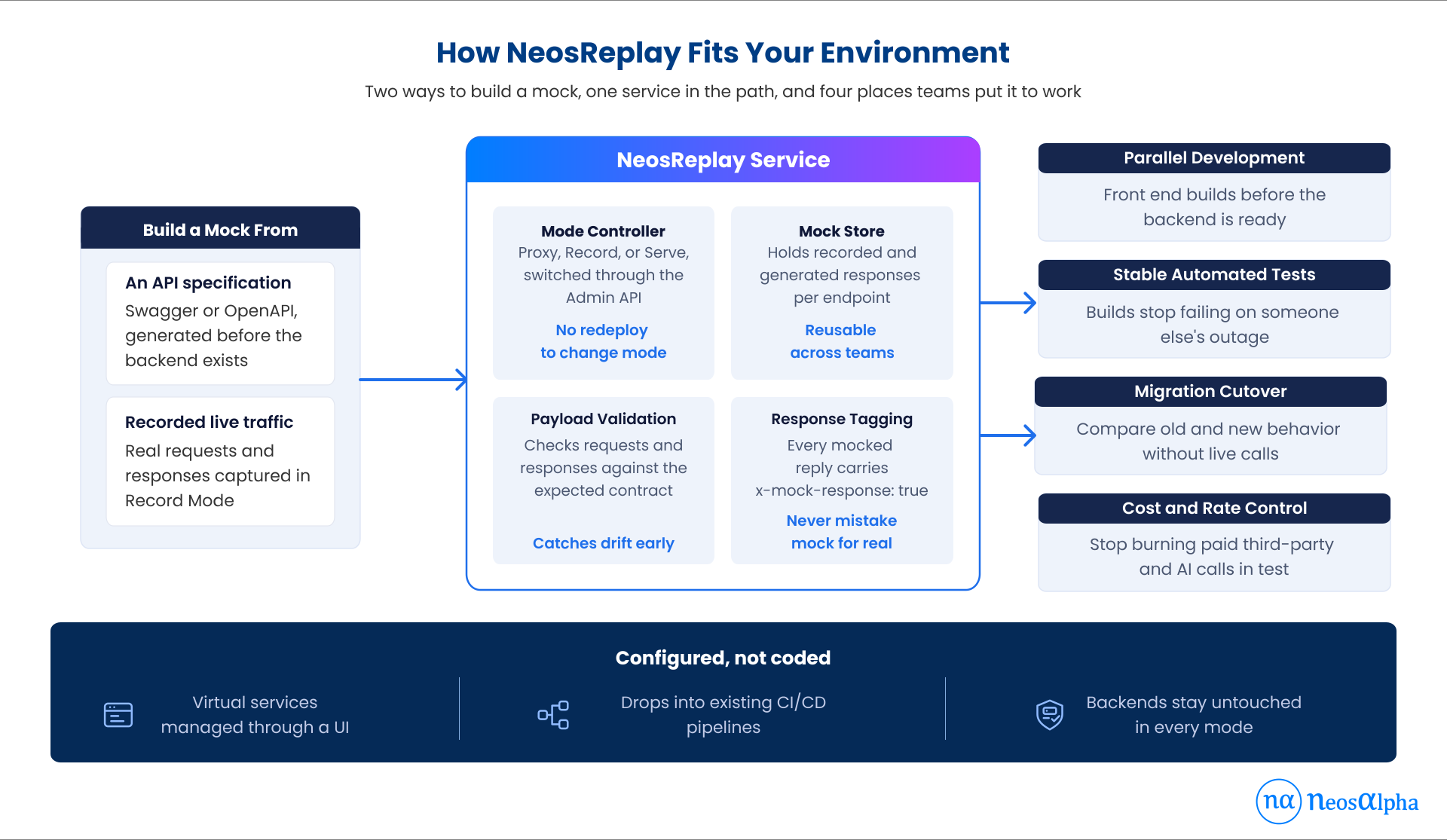
NeosReplay is designed to fit into an existing API request path rather than require a separate application build system. It sits between the API layer and the backend, uses an endpoint-organized mock store, exposes an Admin API for mode control, and labels responses served from mocks.
In Record Mode, traffic continues to the live backend while it captures requests and responses. In Serve Mode, responses come from the mock store instead. Because the client keeps sending requests to the same configured address, teams can change the behavior behind that address without changing the client application.
Where Mocks Should Not Be Trusted
API virtualization can improve delivery speed, but it should not be treated as proof that a live integration is working. A recorded response reflects how a backend behaved when you captured it. If the provider changes its contract later, the mock may continue returning the old response until it is refreshed.
To use virtualization responsibly, keep recorded mocks up to date and run integration tests against real dependencies before release. Teams should also use live systems to measure latency and load behavior: mocks are generally faster and more predictable than the services they represent, so they can’t reliably measure real-world performance.
Why This Matters for API and Integration Teams
The first benefit is delivery speed. Teams can begin work before every backend is ready and avoid losing development time whenever a shared environment is unavailable. A second benefit is confidence in automated testing: when pipelines are less affected by external instability, failures become more useful signals and feedback loops can improve.
There is also a cost benefit. Reducing unnecessary test calls to metered APIs and AI services can lower development spend, while virtualized dependencies can make shared environments less of a bottleneck for teams working in parallel.
Final Thoughts
API teams are accountable for delivery, but they do not control every system their work depends on. NeosReplay reduces that dependency by letting teams proxy live traffic, record real requests and responses, or serve mocks on demand. Teams can generate mocks from Swagger or OpenAPI specifications or capture them from live traffic, and a clear response header helps them distinguish virtualized responses from real ones.
Built within NeosAlpha’s API management and enterprise integration practice, NeosReplay reflects a practical engineering need: give teams a configurable way to keep development and testing moving when backend access is a constraint. Used alongside regularly refreshed mocks and genuine integration testing before release, it can help teams work in parallel, improve pipeline reliability, and control avoidable API usage.

