Introduction
A marketing team fills a spreadsheet with a thousand rows of campaign data, and it starts to buckle. An operations lead wants five people editing the same tracker without overwriting each other. A product manager needs the same records shown as a board, a calendar, and a form, all at once. None of these teams wants to commission a database project, hire a DBA, or wait a quarter for IT. This is the exact moment most organizations discover Airtable, and it is why the platform now serves more than 500,000 organizations, including a large share of the Fortune 100.
Airtable succeeds because it removes a painful decision: spreadsheet or database. It gives you the friendly grid of the former and the relational structure of the latter, with no code in between. That is a genuine advance, and for a great many workflows, it is the right answer. But the same design choices that make Airtable effortless to adopt, per-editor pricing, per-base record ceilings, cloud-only hosting, and a governed but bounded API, are precisely the choices that determine whether it can carry a workload once that workload grows past a pilot. Adopting Airtable is easy. Knowing where it stops being the right home for your data is the harder and more valuable judgment, and it is the one this guide is written to help you make.
What follows is a technical walk-through of what Airtable is, how its relational model and API actually behave, what it really costs at scale in 2026, where its limits begin to bite, and how enterprise teams integrate or move beyond it without throwing away the interface their people already trust.
What is Airtable?
Airtable is a cloud-based platform that combines a spreadsheet-style interface with a relational database engine. You organize information in bases and tables, link related records across those tables, and present the same underlying data as a grid, a kanban board, a calendar, a gallery, or a form. All of it happens without writing SQL or standing up a server, which is why non-technical teams reach for it and why technical teams tolerate it as a shared front-end.
The platform is used for project planning, lightweight CRM, content operations, inventory tracking, and hundreds of other structured workflows. Beyond the familiar spreadsheet grid, it adds rich field types, linked records, customizable forms, granular collaboration controls, and native connections to tools such as Slack, Google Drive, Jira, and Salesforce. In early 2026, Airtable repositioned itself as an AI-native application platform, placing a conversational builder called Omni and a large-scale data layer called HyperDB at the center of its enterprise story.
The distinction worth holding on to from the start is this: Airtable is a very good system of engagement, where people interact with data, and a limited system of record, the authoritative store that other systems depend on. Understanding where your workload sits on that line is the single most useful thing you can do before committing to it.
Database vs Spreadsheet: What Airtable Actually Is
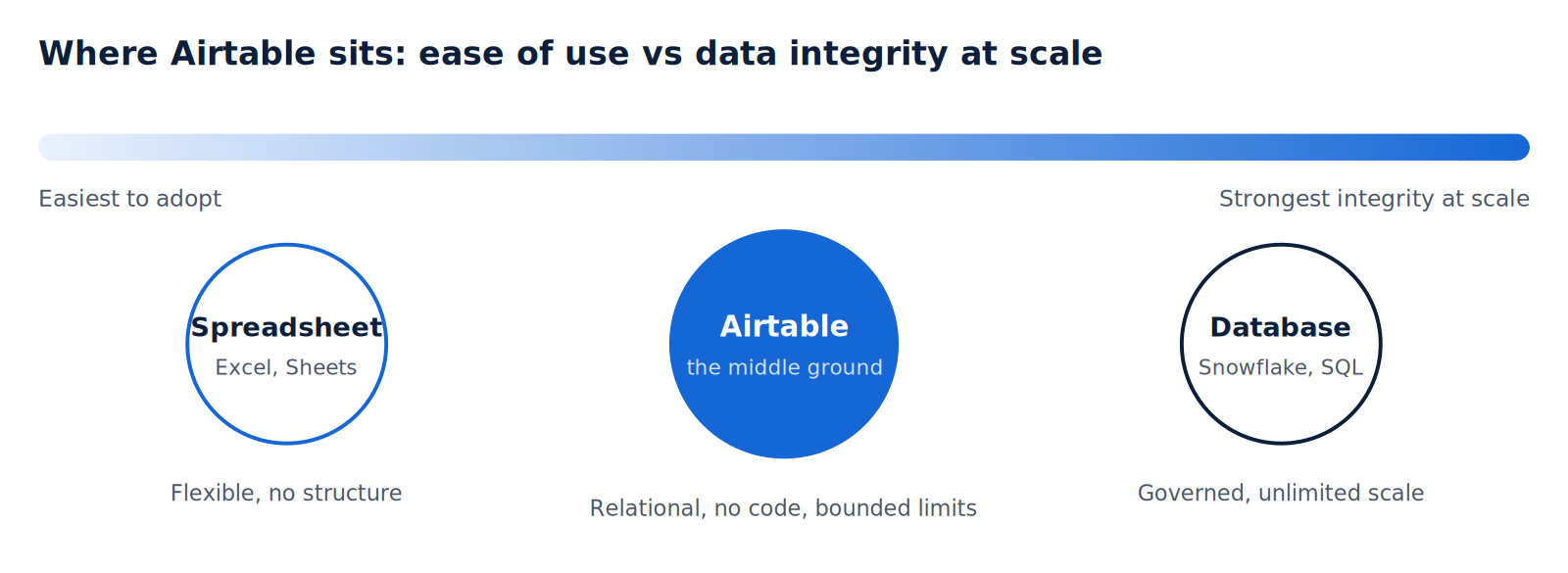
Spreadsheets such as Excel and Google Sheets present data as a grid of cells, where any cell can hold a value or a formula. They are built for direct manipulation and ad hoc calculation. They are excellent at that and poor at enforcing structure, because nothing stops a user from typing a date into a number column or duplicating the same customer across forty rows.
Relational databases take the opposite stance. They store data in structured tables, enforce types and relationships, and let you query with a language such as SQL. That structure is what guarantees integrity across large datasets, but it historically came with a cost: schema design, database administration, and a learning curve that put it out of reach for most business teams.
Airtable’s value lies in borrowing the discipline of the database while hiding the cost. Each field has a type. Records in one table can reference records in another. You get lookups, rollups, and referential consistency, but you configure them by pointing and clicking rather than writing DDL. The trade-off, and it matters technically, is that you are not getting a full relational database. You are getting a governed abstraction over one, with the vendor’s limits baked in.
The mental model that matters: a spreadsheet trusts the user to keep data clean. A database enforces cleanliness through structure. Airtable enforces some of that structure through field types and links, which is why it scales further than a spreadsheet, but it is not a substitute for a governed data platform when integrity, volume, and compliance are non-negotiable.
The Relational Model, Explained for Builders
To use Airtable well, it helps to map its vocabulary onto concepts you already know. The following table translates Airtable’s terms into their spreadsheet and database equivalents.
| Airtable term | Spreadsheet | Database | What it does |
|---|---|---|---|
| Base | Workbook | Database/schema | A container for related tables representing one process |
| Table | Worksheet | Table/relation | A collection of records of one type |
| Record | Row | Row/tuple | A single entry, such as one customer |
| Field | Column | Column/attribute | A typed attribute: text, number, date, link, and more |
| Linked record | VLOOKUP ref | Foreign key | A relationship connecting records across tables |
| Lookup/rollup | Nested formula | JOIN with aggregation | Pulls or summarizes values from linked records |
| View | Filtered sheet | Saved query | A filtered, sorted presentation of records |
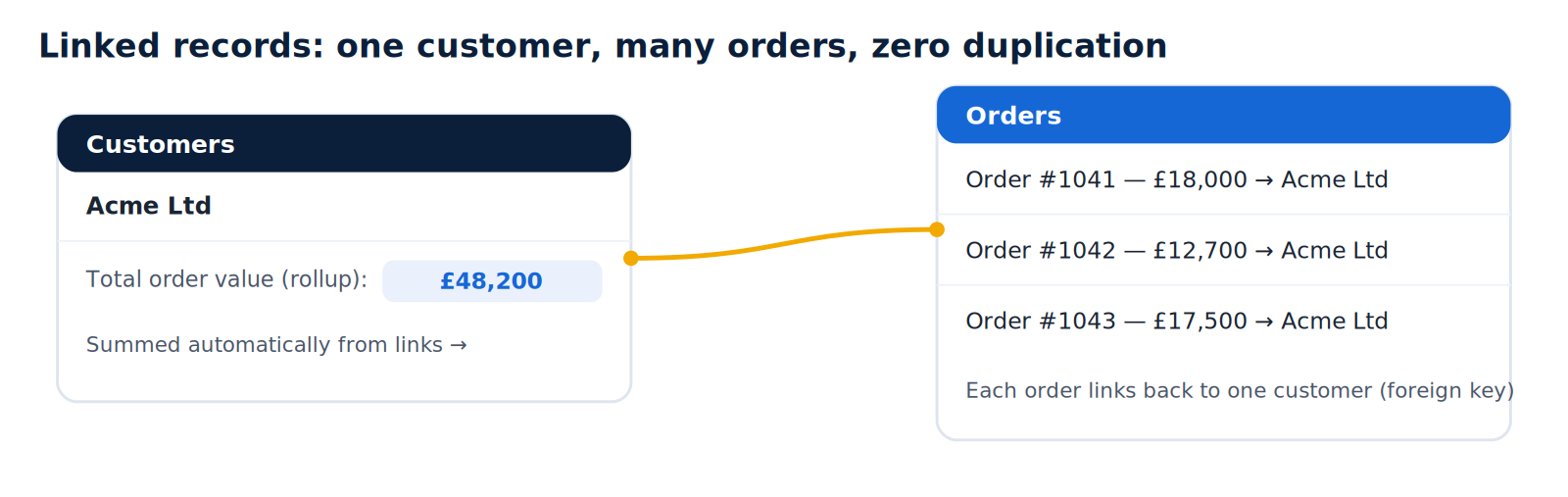
The linked record is the feature that separates Airtable from a fancier spreadsheet. Instead of copying a customer’s details into every order row, you store the customer once and link each order to it. A rollup can then sum the order totals back onto the customer record. This is a foreign-key relationship with aggregation, presented visually. It eliminates duplication, keeps values consistent across the base, and is the reason Airtable can model genuinely relational workflows that a flat sheet cannot.
 Core Features and Benefits of Airtable
-
Flexible views over one source of truth
A single table can be shown as a grid for editing, a kanban board for workflow, a calendar for scheduling, a gallery for visual records, and a form for collection. Because every view reads from the same records, filtering or grouping never forks the data. This lets an operations lead, a marketer, and an executive each look at the same table through the lens they need.
-
Rich field types and linked records
Fields go well beyond text and numbers to include single- and multi-select, attachments, checkboxes, dates, formulas, lookups, rollups, and links to other tables. Combined, these turn a table into a lightweight relational model that enforces a useful degree of structure without any schema scripting.
-
Collaboration and access control
Teams can assign records, comment inline, track activity history, and set permissions ranging from read-only to comment-only to full edit. This granularity is what makes Airtable usable across departments, though, as the pricing section explains, edit permission is also the meter that drives your bill.
-
Forms, templates, and automations
Airtable forms feed submissions directly into a table and can be embedded or shared via a link. A large template gallery covers common processes, including content calendars, product roadmaps, and CRMs. Native automations let you define triggers and actions without external tooling for straightforward cases.
-
Integrations
Native connectors link Airtable to Slack, Google Drive, Jira, Salesforce, Tableau, and others, while services such as Zapier and Make extend that reach to hundreds more applications. For technical teams, the API and scripting environment are the most durable integration surfaces.
Whether you are hitting record limits, wiring Airtable into Salesforce, Snowflake, or Databricks, or preparing a compliant migration, we can help.Planning to scale beyond Airtable, or integrate it properly?
Omni AI, HyperDB, and Agents: What Changed in 2026
Airtable’s 2026 direction is worth understanding on its own terms because it reshapes both what the platform can do and where its ceilings sit.
-
Omni, the conversational builder
Omni is Airtable’s AI app builder. You describe what you want in natural language, and Omni generates the tables, interfaces, and automations to match, then lets you inspect and edit the underlying data and logic rather than leaving you with an opaque black box. It can also perform analysis across large volumes of unstructured content such as call transcripts or contracts. Every Airtable plan now includes a monthly allocation of AI credits, with additional credits and advanced usage priced as add-ons. Enterprise administrators choose which model providers are enabled and where AI is permitted to run.
-
HyperDB, the large-scale data layer
HyperDB is a storage layer that sits outside a normal base and can hold up to 100 million records in a single table. It is designed to sync large datasets from warehouses such as Snowflake and Databricks, then make that data available to Airtable apps and agents while administrators keep governance. HyperDB is an Enterprise Scale capability, with a default of a small number of tables per organization and additional tables available as an add-on, and it is not offered where European data residency is enabled. For a data engineering team, this is the clearest signal of Airtable’s ambition and of its boundary: it wants to operationalize warehouse data, but the warehouse remains the system of record.
-
Field agents
Airtable now supports agents that execute repeated tasks across records at scale, such as researching every company in a large list with the same prompt or classifying thousands of feedback items consistently. This is genuinely useful for high-volume, uniform AI work that a single chat interaction cannot cover, and it consumes AI credits accordingly.
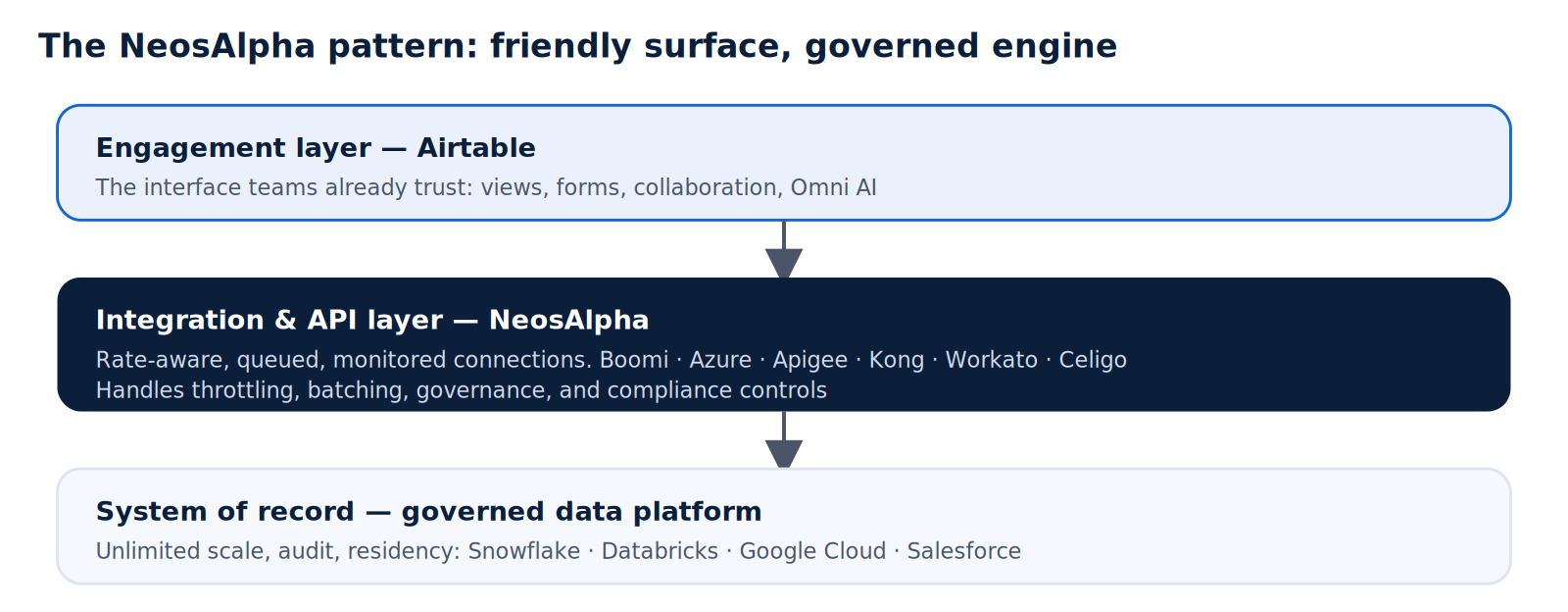
Technical read: the 2026 additions strengthen Airtable as an engagement and orchestration layer atop governed data, rather than turning it into the governed store itself. HyperDB explicitly pulls from Snowflake and Databricks. That architecture, a friendly front-end over an enterprise data platform, is precisely the pattern NeosAlpha builds and hardens for clients.
The API, Automation, and the Limits That Matter
For a technical evaluation, features are secondary to constraints. Airtable exposes a well-documented REST API and a JavaScript environment that runs within a base, both of which are capable of integration and extension. What determines whether Airtable can anchor a production workflow is not the presence of the API but its throughput and the surrounding ceilings.
- API rate limits are enforced per base and measured in requests per second. For high-frequency, system-to-system traffic, this becomes the binding constraint, and it is not something you can simply buy your way past at every tier. High-volume pipelines usually need a queue, a cache, or a batching layer in front of Airtable rather than direct chatter against the base.
- Automation runs are capped monthly by plan. Every trigger and script execution counts, so a workflow that looks free during a pilot can force a tier upgrade once it runs at production frequency.
- Record limits are per base and cumulative across all tables in that base. Crossing the ceiling does not degrade gracefully; it halts new records until you archive, split the base, or upgrade. The upgrade applies across the workspace, not just the affected base.
- Cloud-only hosting means there is no self-hosted or on-premises option. Data residency and sovereignty are handled by Airtable’s controls, not yours.
A minimal example of reading records through the API illustrates how straightforward integration is at low volume and why batching and rate awareness matter at high volume.
|
None of this makes Airtable a poor choice. It makes Airtable a bounded choice. The engineering discipline is to know the bounds before you build against them, so that the day you approach a limit is a planned migration rather than an outage.
| Case Study – UK’s Leading Insurance Company Replaces Legacy HR Performance Management Platform with Airtable |
Airtable Pricing in 2026
Airtable bills per editor. Anyone who can modify at least one base in a workspace counts as a paid seat for the full month, while read-only viewers, form submitters, and share-link viewers remain free across all plans. That model is fair on paper and expensive in practice, because edit access tends to spread quietly across an organization until the invoice reflects it.
| Plan | Price (2026) | Records/base | Best fit |
|---|---|---|---|
| Free | $0 (up to 5 editors) | 1,000 | Personal projects, evaluation, small pilots |
| Team | ~$20/seat/mo annual (~$24 monthly) | 50,000 | Small to medium teams, moderate data |
| Business | ~$45/seat/mo annual (~$54 monthly) | 125,000 | Cross-team use needing sync, SSO, admin |
| Enterprise Scale | Custom (typically $60+/seat) | 500,000+ | Large orgs: compliance, HyperDB, audit |
Three meters can independently force an upgrade: seats, records per base, and automation runs. The jump from Team to Business roughly doubles the per-seat price, so a team crossing the 50,000-record ceiling on a single base can see its bill rise sharply for reasons unrelated to headcount. Several costs also sit outside the sticker price and catch teams off guard:
Plus, add-on costs most teams miss: Portals for external users (~$120-150/mo), extra AI credit packs, and integration middleware such as Zapier or Make.
- Portals for external users start at $120 to $150 per month for a small block of guests, on top of your plan.
- AI credits beyond the monthly allocation are billed as add-on packs once Omni and agents are used at volume.
- Integration middleware such as Zapier or Make often incurs an additional monthly fee when native automations are not enough.
- Billing policy: as of late 2025, mid-cycle seat removals are no longer prorated as refunds, so removing users no longer immediately reduces spend.
Cost-control tip: grant edit access only to people who genuinely create or modify records. A ten-person team where four edit and six view pays for four seats, not ten. Auditing permissions is the fastest lever on an Airtable bill, and it is the one most teams pull only after the invoice surprises them.
What is Airtable Used For
Airtable is at its best when the dataset is moderate, collaboration is human, and the workflow benefits from multiple views on a single source of truth. Common patterns include:
- Project and campaign management, where kanban, calendar, and grid views let different roles work on the same plan.
- Lightweight CRM, using linked records to connect accounts, contacts, and deals without a heavyweight platform.
- Content operations, planning, and tracking assets across channels with owners, deadlines, and linked resources.
- Inventory and asset tracking for small- to medium-volume operations, with custom fields for suppliers and stock levels.
When Not to Use Airtable
The honest answer is that Airtable becomes the wrong primary system, though often still a useful front-end, in a predictable set of conditions:
- Large or high-growth datasets that will cross per-base record ceilings, where stability and query speed at volume matter more than convenience.
- High-frequency integrations that would hit API rate limits, or complex automations beyond what native runs comfortably support.
- Regulated or sensitive data in finance, healthcare, law, or the public sector, where self-hosting, residency control, detailed audit logging, and bespoke security are required and cloud-only proprietary hosting cannot satisfy them.
- Heavy analytics and reporting that outgrow basic summaries and belong in a warehouse and BI stack.
- Deep customization or vendor independence, where a closed-source platform and its switching costs create real lock-in risk.
The recurring theme is that Airtable’s limits are commercial and architectural, not incidental. They are how the product is designed. The right response is rarely to abandon the interface people like; it is to change what sits behind it.
How NeosAlpha Helps Enterprises Scale Beyond Airtable
NeosAlpha is a digital transformation and integration consultancy that helps enterprises modernize how their systems and data work together. Our teams work across the platforms that typically sit on either side of a tool like Airtable, including Boomi, Azure Integration Services, Apigee, Kong, Workato, Celigo, Google Cloud, Databricks, and Snowflake. That places us in a specific and useful position: we can keep Airtable where it earns its keep, as the interface your people already trust, while making sure the data behind it is governed, integrated, and built to scale.
Where we add value
- Integration engineering: We build resilient, rate-aware integrations between Airtable and your core systems using iPaaS and API management, so high-frequency traffic is queued, batched, and monitored rather than hammering a base until it throttles.
- Data platform and migration: When a workload outgrows record ceilings or requires analytical depth, we move the system of record to Snowflake, Databricks, or a governed cloud database and connect it back to Airtable, including via HyperDB where appropriate, so users keep their familiar front-end.
- Governance and compliance: For regulated clients, we design the audit logging, residency, and access controls that a cloud-only tool cannot provide on its own, keeping sensitive data in systems that meet your obligations.
- Automation and AI workflows: We implement production-grade automation and AI pipelines on platforms such as Workato and major cloud providers, ensuring business-critical processes are not constrained by monthly run caps or single-tool limits.
The pattern we deliver most often is straightforward to state and demanding to execute well: let Airtable be the friendly surface, and let a governed integration and data platform be the engine. That is how you keep the adoption Airtable buys you without inheriting the ceiling it imposes.
Conclusion
Airtable earns its place. It closed a real gap between the spreadsheet people can use and the database people avoid, and it did so well enough to become the default across marketing, operations, and product teams. For moderate datasets, human-scale collaboration, and workflows that benefit from multiple views of a single source of truth, it is often the correct and most cost-effective choice. Nothing in this guide argues against using it.
Airtable’s constraints are not accidents to be worked around later; they are deliberate product decisions. Per-editor billing, per-base-record ceilings, monthly automation caps, API rate limits, and cloud-only hosting are the tool’s shape. The teams that get the most from Airtable are the ones that understand these limits at the point of adoption, so that approaching a ceiling is a planned architectural step rather than a production incident or a budget shock.
When that step arrives, the goal is rarely to abandon the interface people rely on. It is to change what sits behind it. Keep Airtable as the engagement layer, move the system of record and the heavy processing to a governed data and integration platform, and connect the two with integrations built to production standards. That is the pattern that preserves everything valuable about Airtable while removing the ceiling it imposes, and it is the work NeosAlpha does every day. If you are approaching that inflection point, the right time to plan for it is before the limit forces your hand.