Introduction
The modern enterprise generates more data than ever before, from IoT sensors and transactional databases to SaaS apps and cloud services. Yet for most organizations, this data remains trapped in disconnected silos: data engineering lives in one platform, warehousing in another, machine learning in a third, and business intelligence in a fourth. Stitching these together demands constant integration work, expensive licensing, and months of engineering effort.
Microsoft Fabric was built to solve exactly this problem. Announced in May 2023 and generally available from November 2023, Fabric is Microsoft’s most ambitious data platform to date, a unified, end-to-end analytics solution that brings data engineering, data science, real-time intelligence, data warehousing, and business intelligence under a single SaaS roof.
In this guide, we’ll break down everything you need to know about Microsoft Fabric: what it is, how it’s architected, what its core components do, and why leading enterprises are making it the backbone of their data strategy.
What Is Microsoft Fabric?
Microsoft Fabric is a comprehensive analytics platform that supports end-to-end data workflows, including data ingestion, transformation, real-time stream processing, analytics, and reporting. It provides integrated experiences across Data Engineering, Data Factory, Data Science, Real-Time Intelligence, Data Warehouse, and Power BI, all operating on a shared compute and storage model.
Think of Fabric as Microsoft’s answer to the modern data stack fragmentation problem. Before Fabric, organizations using Azure services had to manually connect to Azure Synapse Analytics, Azure Data Factory, Azure Databricks, and Power BI. Each product came with its own billing model, identity and access management system, and data storage layer. Integration between them required considerable DevOps overhead.
Fabric changes that equation fundamentally. All workloads are delivered as a single SaaS platform, licensed under a unified capacity model, and connected to a common storage layer (OneLake). There’s no plumbing to wire together; it’s all built in.
Key fact: Fabric uses OneLake as a centralized, logical data lake to store and access data across all workloads, eliminating the need to move or duplicate data between services.
Why Did Microsoft Build Fabric?
The data analytics market had been fragmenting for a decade. Organizations adopted best-of-breed tools for each layer of the data stack: Fivetran for ingestion, dbt for transformation, Snowflake for warehousing, Databricks for ML, and Tableau or Power BI for visualization. Each tool solved its specific problem well, but integration between them created complexity, cost, and data governance challenges.
Microsoft’s thesis with Fabric is that convergence is the next wave. Rather than connecting disparate tools, the future of data analytics is a unified platform where every component is a first-class citizen, deeply integrated at the storage, governance, and AI layer. That’s what Fabric is designed to deliver.
Specifically, Fabric was designed to address four critical pain points organizations face:
- Data silos: Different teams working on isolated data stores with no shared access layer
- Integration complexity: Engineering effort required to connect ingestion, transformation, and visualization tools
- Governance fragmentation: Inconsistent security, access control, and compliance policies across tools
- Cost inefficiency: Idle compute in one tool that cannot be used by another, wasting cloud spend
Microsoft Fabric Architecture: How It Works
Understanding Fabric’s architecture is key to appreciating what makes it different. At its core, Fabric is a SaaS platform; you don’t manage the underlying infrastructure. Microsoft handles availability, scaling, and updates. You provision capacity (via Fabric Capacity, Microsoft 365, or Power BI Premium), and all workloads share that compute pool.
The Three-Layer Architecture
Fabric’s architecture can be conceptualized in three layers:
- Storage Layer (OneLake): A unified logical data lake built on Azure Data Lake Storage Gen2, storing all organizational data in open Delta/Parquet format. All Fabric workloads read from and write to OneLake; there is no separate storage per workload.
- Platform Layer: Shared services, including Copilot (AI assistance), governance (via Microsoft Purview), compute orchestration, and identity management that operate consistently across all experiences.
- Workload Layer: Role-specific experiences, Data Factory, Data Engineering, Data Science, Real-Time Intelligence, Data Warehouse, Databases, and Power BI, each optimized for specific tasks but all sharing the platform layer below.
This architecture means data doesn’t need to move between workloads. A data engineer loads raw data into a Lakehouse via Data Engineering; a data scientist can immediately access the same data for model training via Fabric Data Science; a business analyst can then visualize results in Power BI, all without a single data copy or pipeline between them.
Capacity Model
Fabric is licensed via capacity units (CUs), which represent compute power shared across all workloads. When a workload completes a task, its unused CUs become available to other workloads. This is fundamentally different from the traditional model, where you provision separate compute for your data warehouse, your Spark cluster, and your BI service, paying for idle resources across all of them.
Whether you're modernizing legacy data platforms, building a lakehouse architecture, or enabling AI-driven analytics, our experts can help you get started.Planning Your Microsoft Fabric Journey?
OneLake: The Foundation of Microsoft Fabric
If Fabric is the platform, OneLake is its heartbeat. OneLake is a single, unified, logical data lake built into Fabric that serves as the sole storage layer for all workloads. Microsoft has described it as the OneDrive for data, just as all Microsoft 365 apps save to OneDrive automatically, all Fabric workloads read and write from OneLake automatically.
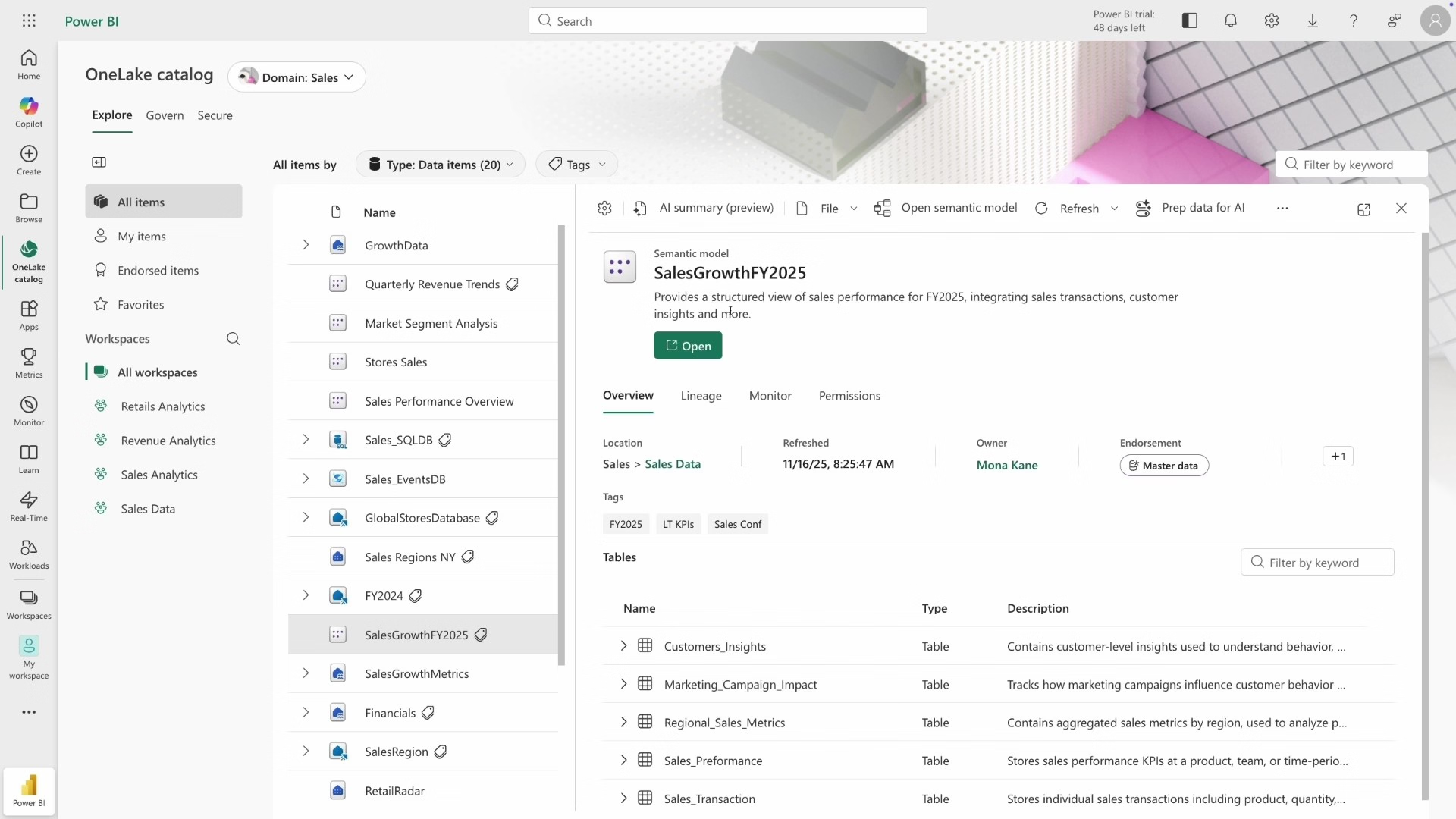
Microsoft OneLake in action – Image Source
OneLake Key Features
- Single storage, no silos: Every workspace in Fabric has exactly one OneLake. There’s no per-workload storage to provision or manage, and no data silos between teams.
- Open format (Delta/Parquet): Data in OneLake is stored in open Delta Lake format by default, meaning it’s not locked to Microsoft’s proprietary format. Other tools, Databricks, Apache Spark, and Trino, can access the same data directly.
- Shortcuts: OneLake Shortcuts allow you to reference data stored in external locations (Azure Data Lake Storage, Amazon S3, Google Cloud Storage, Dataverse) and surface them in Fabric as if they were local, without copying the data. This eliminates data duplication while enabling cross-cloud data access.
- Zero-copy replication: Mirroring capabilities allow you to continuously replicate data from Azure SQL Database, Azure Cosmos DB, Snowflake, Azure Databricks, and Fabric SQL database directly into OneLake, again without duplicating storage.
- OneLake Catalog: A centralized hub for discovering, exploring, governing, and accessing all data and analytics artifacts in your Fabric tenant.
| Recommended Read: Microsoft Fabric vs Power BI: Which One Should You Choose? |
Microsoft Fabric Components and Workloads
Fabric is organized into role-specific workloads, each designed for a specific persona and set of tasks. Here’s a detailed breakdown:
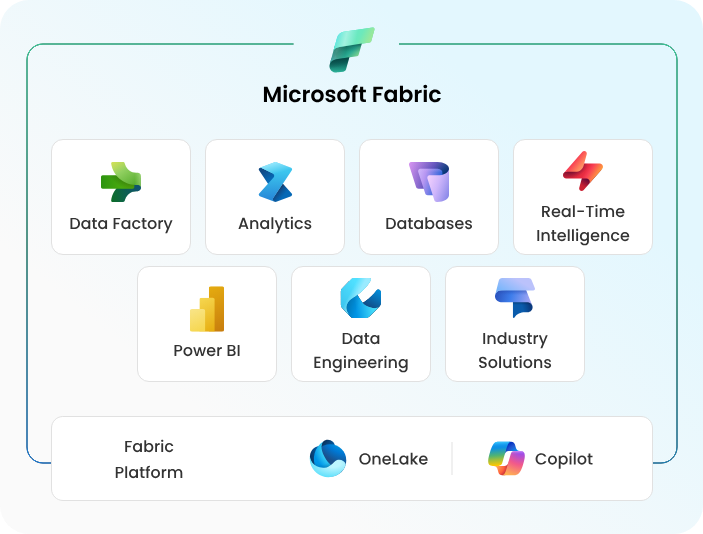
1. Power BI
Power BI is Microsoft’s industry-leading business intelligence and visualization tool, now fully embedded within Fabric. Business analysts can connect to any data in OneLake to create interactive reports, dashboards, and scorecards. Within Fabric, Power BI benefits from DirectLake mode, a new query engine that reads data directly from OneLake at near in-memory speed, eliminating the traditional trade-off between dataset size and query performance.
2. Data Factory
Data Factory is Fabric’s data integration and orchestration engine. It provides a rich set of data connectors (200+), including both cloud and on-premises sources, for ingesting data into OneLake. It incorporates Power Query for low-code transformations and supports building complex data pipelines with scheduling, monitoring, and alerting. Data Factory in Fabric supersedes the standalone Azure Data Factory for most enterprise integration scenarios.
3. Data Engineering
Data Engineering workload provides Apache Spark-based processing for large-scale data transformation. Data engineers write notebooks in Python, Scala, SQL, or R to process raw data in OneLake, build Lakehouses (combined lake + SQL endpoints), and schedule transformation jobs. Spark compute in Fabric is managed; no Spark cluster setup or configuration is required. Integration with Data Factory allows notebooks and Spark jobs to be orchestrated within pipelines.
4. Data Warehouse
Fabric Data Warehouse provides enterprise-grade T-SQL analytics at a petabyte scale. It separates compute from storage (both backed by OneLake), enabling independent scaling. Fabric Warehouse natively stores data in open Delta Lake format, which means data engineers and data scientists can access the same data using Spark or Python without T-SQL, eliminating the historical silo between SQL and Spark workloads.
5. Data Science
Fabric Data Science enables the building, training, evaluation, and deployment of machine learning models. It integrates with MLflow for experiment tracking and model registry. Data scientists can use Fabric notebooks (Jupyter-compatible) with built-in access to OneLake data, and publish predictions back to OneLake for downstream consumption by Power BI reports or other pipelines.
6. Real-Time Intelligence
Real-Time Intelligence handles streaming data workloads, IoT sensor data, application logs, clickstreams, and financial ticks. It includes Eventstream (no-code streaming pipelines), KQL Database (an Azure Data Explorer-based analytics engine for time-series and log data), and the Real-Time Hub, which serves as a catalog of organizational data streams. This enables sub-second latency analytics on data in motion.
7. Databases
The Databases workload in Fabric brings operational/transactional database capabilities into the platform. This includes Fabric SQL Database (a fully managed transactional database inside Fabric) and mirroring capabilities that continuously replicate data from external databases into OneLake.
8. Fabric IQ (Preview)
Fabric IQ is a new workload for unifying business semantics across data, models, and systems. It enables building ontologies, semantic models, and data agents that power consistent decisions and reusable metrics across the entire Fabric platform.
Here’s a quick reference table of all Fabric workloads:
| Workload | Primary Persona | Key Capability | Replaces / Extends |
| Power BI | Business Analyst | Visualization & BI reports | Power BI Standalone |
| Data Factory | Data Engineer | Ingestion & Orchestration | Azure Data Factory |
| Data Engineering | Data Engineer | Spark-based transformation | Azure Synapse Spark |
| Data Warehouse | Data Analyst / DBA | T-SQL analytics at scale | Azure Synapse SQL Pool |
| Data Science | Data Scientist | ML model training & deployment | Azure Machine Learning |
| Real-Time Intelligence | Data Engineer / Analyst | Streaming & time-series analytics | Azure Data Explorer + Event Hubs |
| Databases | Developer / DBA | Transactional database in Fabric | Azure SQL Database |
| Fabric IQ | Data Modeler | Semantic models & data agents | New capability |
AI and Copilot in Microsoft Fabric
Microsoft has embedded AI deeply into every layer of Fabric, not as an add-on, but as a first-class capability. Azure OpenAI Service is integrated throughout, and Fabric Copilot surfaces in every workload to assist users with:
- Writing and debugging Spark/SQL code in notebooks
- Building and explaining data pipelines in Data Factory
- Generating DAX measures and report visuals in Power BI
- Creating KQL queries for Real-Time Intelligence
- Summarizing data and generating natural-language insights
This makes Fabric uniquely positioned for the era of AI-powered analytics. Copilot in Fabric respects tenant and data boundaries; it cannot access data that users don’t have permission to view, which is critical for enterprise compliance.
Governance and Security in Microsoft Fabric
One of the most underappreciated capabilities of Fabric is its built-in governance layer, powered by Microsoft Purview. Governance in Fabric is centralized, automatic, and inherited:
- Sensitivity labels applied to a dataset automatically propagate to all downstream reports and exports
- Access policies and permissions are managed once in the Fabric Admin Portal and apply consistently across all workloads
- Data lineage tracks the full journey from source to report, enabling impact analysis and compliance audits
- The OneLake Catalog provides a tenant-wide view of all data assets, their owners, certification status, and access policies
This is a stark contrast to the traditional multi-tool approach, where each tool had its own security model, and governance was a patchwork of separate configurations.
Microsoft Fabric vs. Azure Synapse Analytics
The most common question from existing Azure customers is how Fabric relates to Azure Synapse Analytics. The short answer: Fabric is the evolution of Synapse. Microsoft has positioned Fabric as the successor to Synapse, consolidating its capabilities into a more unified, user-friendly SaaS experience.
Key differences: Synapse requires separate provisioning and management of Spark pools, SQL pools, and pipelines. Fabric unifies all of these under a single capacity model with shared OneLake storage. Synapse’s governance was Azure-level; Fabric’s is Purview-integrated tenant-wide.
Microsoft continues to support Synapse, but all new investments and innovation are being directed to Fabric.
Who Should Use Microsoft Fabric?
Fabric is designed for organizations that:
- Need a unified platform to consolidate disparate data tools (Synapse, ADF, Power BI, Azure ML)
- Are scaling their data operations and need a platform that grows with them
- Want to reduce integration overhead and total cost of ownership
- Are you investing in AI/ML and need data science capabilities tightly integrated with your analytics stack
- Require enterprise-grade governance, compliance, and data lineage
- Are heavily invested in the Microsoft 365 / Azure ecosystem
Organizations outside the Microsoft ecosystem, or those with workloads heavily dependent on non-Microsoft open-source tooling, may find Fabric’s opinionated architecture less flexible, though the open Delta format and shortcut capabilities help significantly on this front.
Getting Started with Microsoft Fabric
Getting started with Fabric is easy. Microsoft offers a free trial that gives you access to all workloads for 60 days. Here’s a typical adoption path:
- Explore the Fabric portal: Sign in at app.fabric.microsoft.com and explore workspaces.
- Create a Lakehouse: Start by creating a Lakehouse in the Data Engineering workload and uploading sample data.
- Build a pipeline: Use Data Factory to connect to a source system and ingest data into your Lakehouse.
- Create a Power BI report: Use the auto-generated SQL endpoint of your Lakehouse to build a report in Power BI.
- Enable governance: Set up sensitivity labels and workspace-level access controls via the Admin Portal.
How NeosAlpha Helps You Implement Microsoft Fabric
Implementing Microsoft Fabric at enterprise scale requires more than just provisioning a tenant. It requires a clear data strategy, a migration plan from existing tools (Synapse, ADF, on-prem SQL), a governance framework, and training for your data teams.
NeosAlpha is a Microsoft partner with deep expertise in the full Fabric stack. Our services include:
- Fabric Readiness Assessments: Evaluating your current data landscape and mapping a pragmatic path to Fabric adoption
- Migration Services: Moving existing Synapse, ADF, and Power BI workloads to Fabric with minimal disruption
- Architecture Design: Designing OneLake topology, workspace structures, and governance frameworks aligned to your organizational structure
- Custom Fabric Implementations: Building end-to-end data pipelines, Lakehouses, and reporting solutions on Fabric
- Training & Enablement: Upskilling your data engineering, analytics, and BI teams on Fabric workloads
Conclusion
Microsoft Fabric represents a genuine paradigm shift in how enterprises approach data analytics. By unifying ingestion, engineering, science, real-time analytics, warehousing, and business intelligence on a shared SaaS platform with a common storage layer (OneLake) and built-in AI, Fabric eliminates the integration tax that has long held back data-driven organizations.
For Microsoft-aligned enterprises, Fabric is no longer a future consideration; it’s the present foundation. Whether you’re consolidating from Azure Synapse, scaling your Power BI investment, or building your first enterprise data platform, Fabric offers a compelling, comprehensive solution.
The question for most organizations isn’t whether to adopt Fabric, but how to adopt it effectively, and that’s where NeosAlpha can help.