Introduction
Microsoft BizTalk Server has served as the backbone of enterprise integration for over two decades, connecting disparate applications, automating business processes, and enabling B2B communication for thousands of organizations worldwide. However, as we move through 2025 and into 2026, the BizTalk to Azure migration conversation is no longer optional for most enterprises. It is now a strategic imperative driven by firm end-of-life deadlines, rising infrastructure costs, and the growing maturity of Azure Integration Services as a cloud-native replacement.
In this guide, we will cover the business case, technical challenges, step-by-step migration phases, tool selection, and best practices for BizTalk-to-Azure migration.
Understanding the BizTalk End-of-Life Timeline and What It Means for Your Business
Before planning the migration, every organization must understand exactly where BizTalk Server stands in its product lifecycle. The deadlines are clear and non-negotiable.
| BizTalk Version | Mainstream Support Ends | Extended Support Ends | Critical Dependency |
| BizTalk Server 2016 | 11 Jan 2022 (expired) | 11 Jan 2027 | SQL Server 2016 EOL: 14 Jul 2026 |
| BizTalk Server 2020 | 11 Apr 2028 | 9 Apr 2030 | SBMP Protocol Retirement: 30 Sep 2026 |
A critical dependency to note is that Microsoft SQL Server 2016 goes out of Extended Support on 14 July 2026, which directly affects BizTalk Server 2016 environments that depend on it as their database backend.
While BizTalk Server 2020 appears to have a longer runway, there is an urgent intermediate deadline that organizations often overlook.
The September 2026 SBMP Protocol Retirement
Even before the formal end-of-life dates, Microsoft is retiring the Service Bus Messaging Protocol (SBMP) on 30 September 2026. The default Azure Service Bus adapter in BizTalk Server 2020 communicates using SBMP. After this date, any BizTalk environment that uses this adapter to connect to Azure Service Bus will fail. The integration will break silently or throw unrecoverable errors, causing operational disruption without a direct Microsoft support channel.
Organizations that want to stay on BizTalk temporarily must migrate the Service Bus adapter to AMQP (Advanced Message Queuing Protocol), which is the modern industry standard. However, this is a complex change in itself, and for many organizations, it is simply more efficient to accelerate the full migration to Azure Integration Services than to invest time in patching an aging platform.
The strategic message from Microsoft is clear. There will be no next version of BizTalk Server. All Microsoft integration investments are now directed toward Azure Logic Apps, Azure Service Bus, Azure Event Grid, Azure API Management, and Azure Functions. These are not approximate replacements; they are a composable, cloud-native architecture that offers capabilities BizTalk was never designed to provide.
Business Case for BizTalk to Azure Migration
The business case for migration extends far beyond deadline compliance. Organizations that migrate proactively unlock tangible operational and financial benefits that on-premises BizTalk environments cannot deliver.
| Dimension | BizTalk Server (On-Premises) | Azure Integration Services | Business Impact |
| Cost Model | Fixed CAPEX: server hardware, Windows Server and SQL Server licenses, BizTalk CALs, admin headcount | Pay-per-execution OPEX. No server hardware. No CALs. | 20-40% reduction in total integration cost of ownership over 3 years |
| Scalability | Manual server sizing. Scale-up requires hardware procurement and reconfiguration of the BizTalk group. | Automatic scale-out. Handles 10 to 10,000,000 messages without infrastructure changes. | Eliminates peak-period bottlenecks and capacity planning overhead |
| Security and Compliance | Manual patching. Custom adapter security is owner-managed. No built-in managed identity. | Microsoft-managed security. Azure AD, managed identities, private endpoints, SOC 2, ISO 27001, HIPAA, GDPR. | Reduced audit effort. Meets modern regulatory requirements by default. |
| Development Speed | BizTalk-specific skills required. Visual Studio + BizTalk tools. Slow deployment cycles. | Low-code Logic Apps designer. 400+ prebuilt connectors. CI/CD via Azure DevOps or GitHub Actions. | 3-5x faster integration delivery for standard use cases |
| SaaS and Cloud Connectivity | Custom adapter development required for most modern SaaS platforms. | Native connectors for Salesforce, Microsoft 365, SAP, Dynamics 365, ServiceNow, and 400+ others. | Eliminates months of custom adapter development for new integrations |
| AI and Automation Readiness | No native AI capabilities. Third-party integration required. | Native integration with Azure OpenAI, Cognitive Services, AI Foundry, and Synapse Analytics. | Foundation for intelligent automation, document processing, and AI-augmented workflows |
Azure Integration Services
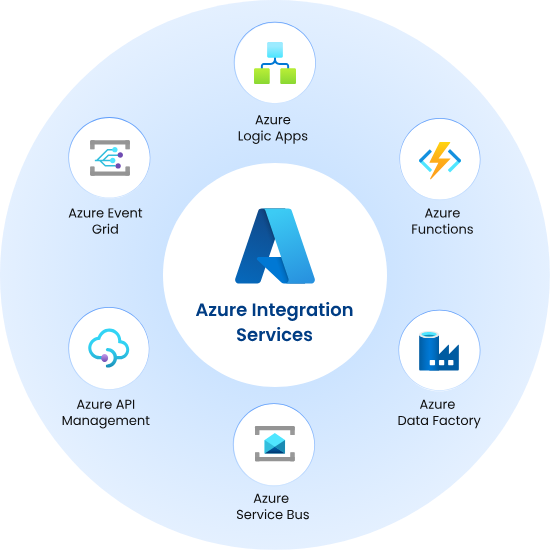
Understanding the components of Azure Integration Services is essential before planning any migration. There is no single Azure service that replaces BizTalk; instead, the platform maps BizTalk capabilities across several complementary services.
-
Azure Logic Apps
Logic Apps is the primary replacement for BizTalk orchestrations and workflows. It provides a low-code, event-driven workflow engine that can trigger on HTTP requests, schedule, Service Bus messages, file uploads, and hundreds of other connectors. Logic Apps Standard, the current tier, adds support for custom C# scripting, stateful and stateless workflows, and map-based transformations with XSLT support, making it the closest architectural equivalent to BizTalk orchestrations and pipelines.
-
Azure Service Bus
Service Bus replaces BizTalk’s messaging backbone, providing reliable message queuing, publish/subscribe via topics, dead-lettering, session handling, and at-least-once or exactly-once delivery guarantees. It is the standard transport layer for asynchronous integrations migrated from BizTalk.
-
Azure API Management
API Management replaces BizTalk’s receive ports and send ports that expose HTTP/SOAP endpoints. It provides a managed gateway for exposing, securing, throttling, and monitoring APIs. It is particularly valuable for organizations that expose BizTalk services to trading partners or internal consumers.
-
Azure Event Grid
Event Grid enables reactive, event-driven integration across Azure services and custom applications. It replaces BizTalk’s polling-based adapters for scenarios where downstream systems need to react to state changes rather than being polled on a schedule.
-
Azure Functions
Functions provides the serverless compute layer for custom transformation logic, message enrichment, and business rule execution. It replaces BizTalk custom pipeline components and helper orchestrations written in .NET code. Logic Apps Standard’s custom code feature allows C# code to run directly within a workflow, further closing the gap with BizTalk’s extensibility model.
-
Azure Data Factory
For organizations using BizTalk as a data movement and ETL tool, Azure Data Factory provides a managed, scalable pipeline for batch and incremental data integration across databases, data lakes, and SaaS platforms.
Key Challenges in BizTalk to Azure Migration
Every BizTalk migration involves a set of predictable technical and organizational challenges. Acknowledging them upfront is the first step toward mitigating them effectively.
-
Complexity of Orchestrations
BizTalk orchestrations are stateful, long-running, and tightly coupled to the BizTalk runtime. They use BizTalk-specific constructs such as correlation sets, convoy patterns, and dehydration/rehydration that have no direct one-to-one equivalent in Logic Apps. Each orchestration must be analyzed individually and redesigned to fit Logic Apps’ stateful workflow model or decomposed into multiple smaller workflows.
-
Custom Adapters and Pipeline Components
BizTalk’s adapter framework supports hundreds of protocols: FTP, SFTP, AS2, X12, EDIFACT, SAP IDOC, HL7, and many others. Some of these are available as Logic Apps connectors; others require custom code in Azure Functions or third-party integration platforms. Custom pipeline components written in .NET must be rewritten as Azure Functions or Logic Apps inline C# scripts.
-
Schema and Map Migration
BizTalk schemas are defined as XSD files, and maps are written using BizTalk Mapper, which generates XSLT. Logic Apps Standard supports XSLT-based maps, which means many BizTalk maps can be migrated with relatively minor adjustments. However, maps that use BizTalk-specific functoids require manual reimplementation as custom XSLT or C# functions.
-
EDI and B2B Integrations
BizTalk has a mature EDI engine for X12, EDIFACT, and AS2 processing. Azure Logic Apps B2B with an Integration Account provides equivalent capabilities, but its configuration model differs. Trading partner agreements, schemas, and acknowledgment settings must be recreated in the Azure Integration Account rather than simply exported from BizTalk.
-
Business Continuity During Migration
Enterprise integration systems are often mission-critical. The migration must be executed to avoid unplanned downtime, data loss, or message duplication. This requires careful phasing, the parallel running of the BizTalk and Azure environments during the transition, and rigorous rollback planning at each stage.
-
Organizational Readiness
BizTalk expertise is scarce and becoming scarcer. Many teams have deep knowledge of BizTalk but limited exposure to Azure. Upskilling is a non-trivial investment. At the same time, teams with Azure skills may lack the integration architecture experience needed to correctly translate BizTalk patterns into cloud-native equivalents.
| Recommended Read: A Complete Guide to Migrating from Microsoft BizTalk to Boomi iPaaS |
Three Migration Approaches For BizTalk to Azure Migration
Not all BizTalk migrations are the same. The approach an organization takes depends on its timeline, risk tolerance, budget, and the complexity of its BizTalk estate.
| Approach | Description | When to Use | Limitations |
| Lift and Shift | Move BizTalk Server VMs to Azure IaaS (Azure Virtual Machines). No changes to BizTalk logic or architecture. | Short-term tactical move to exit the on-premises data center. Buying time before full migration. Resolves hardware refresh constraint. | Still runs BizTalk. No cloud-native benefits. SBMP deadline still applies. Increased Azure IaaS cost. Not a long-term solution. |
| Hybrid Migration | Run BizTalk and Azure Integration Services concurrently. Migrate integrations incrementally while BizTalk handles the remaining workloads. | Phased programs where business continuity is critical. Organizations with large BizTalk estates (100+ integrations). Preferred approach for most enterprise programs. | Requires parallel environment management. Increased operational complexity during transition. Clear governance is needed to prevent scope creep. |
| Full Modernisation | Complete migration to Azure Integration Services. All BizTalk capabilities replaced with cloud-native Azure equivalents. BizTalk fully decommissioned. | Organizations with smaller BizTalk estates. Greenfield or near-greenfield environments. Teams with strong Azure skills. New compliance requirements. | Highest upfront effort and cost. Requires a comprehensive pre-migration assessment and rigorous testing before cutover. |
For most enterprise organizations, the hybrid migration approach is the recommended path. It provides the risk management benefits of parallel running, allows the team to build Azure skills progressively, and delivers incremental value as each integration wave is completed.
BizTalk's end-of-life clock is running. NeosAlpha's certified Azure integration specialists will map your entire BizTalk estate to Azure Integration Services, identify your highest-risk workloads and immediate SBMP dependencies, and give you a realistic, costed migration roadmap.Ready to Start Your BizTalk to Azure Migration?
Step-by-Step BizTalk to Azure Migration Strategy
A structured, phased approach is the only reliable way to execute a BizTalk migration at enterprise scale. The following phases represent best practice for most migration programs.
Phase 1: Discovery and Pre-Migration Assessment
The assessment phase establishes the scope, complexity, and risk profile of the migration. It should produce a complete inventory and a prioritized migration backlog.
- Application inventory: Enumerate all BizTalk applications, receive ports, send ports, orchestrations, pipelines, schemas, maps, and adapters. Document the message volumes, business criticality, and external dependencies for each.
- Dependency mapping: Identify upstream and downstream systems for each integration. Determine which systems will require API changes to communicate with Azure rather than BizTalk.
- Compatibility assessment: Evaluate each BizTalk component against Azure Integration Services equivalents. Classify each as direct migration, redesign required, or complex rebuild.
- Security and compliance review: Document data classification, encryption requirements, audit logging requirements, and regulatory obligations to be carried forward into the Azure architecture.
- SBMP dependency check: Immediately identify any integrations using the default Azure Service Bus adapter in BizTalk, as these require resolution before September 2026.
Phase 2: Architecture Design and Tool Selection
Based on the assessment, the architecture team defines the target Azure integration architecture and selects the appropriate tools for the migration.
- Target architecture definition: Map each BizTalk capability to its Azure equivalent. Define the Logic Apps workspace structure, Service Bus namespace topology, API Management configuration, and Integration Account setup for EDI.
- Migration tooling: Microsoft provides the BizTalk Migration Tool, which can automatically convert certain BizTalk artifacts, including schemas, maps, and simple orchestrations, into Logic Apps workflows. This tool accelerates the migration of standard components but does not cover complex orchestrations or custom adapters. Supplement with Azure Migrate for infrastructure assessment.
- Networking and security design: Define virtual network integration, private endpoints, managed identity configuration, and role-based access control policies for the Azure environment.
- Environment strategy: Establish separate Azure environments for development, testing, staging, and production. Define a CI/CD pipeline using Azure DevOps or GitHub Actions to deploy Logic Apps and related resources.
Phase 3: Pilot Migration
Begin with a low-risk, well-understood integration. The pilot serves to validate the target architecture, test the tooling, and identify unforeseen gaps before committing to full-scale migration.
- Select a pilot candidate: Choose an integration that is high-frequency but non-critical, or one with a well-defined, bounded scope. Avoid starting with complex orchestrations, EDI processing, or integrations with many dependencies.
- Build and test: Implement the pilot integration in Azure. Conduct functional testing, performance testing, and failure scenario testing. Compare behavior against the existing BizTalk implementation.
- Document lessons learned: Capture every decision, gap, and workaround encountered during the pilot. This documentation informs the migration runbook for subsequent waves.
Phase 4: Phased Wave Migration
The main migration proceeds in waves, each moving a defined group of integrations from BizTalk to Azure. Grouping should reflect business criticality, technical dependencies, and team capacity.
- Wave planning: Group integrations logically. For example, Wave 1 might cover internal system integrations with no B2B dependencies. Wave 2 might cover SAP integrations. Wave 3 might cover EDI and trading partner processes.
- Hybrid running: During each wave, keep BizTalk and Azure running in parallel for the migrating integrations. Route traffic progressively from BizTalk to Azure as testing confirms readiness.
- Cutover and validation: For each wave, execute a planned cutover during a low-traffic window. Validate message processing end-to-end in production before decommissioning the BizTalk equivalent.
- Rollback readiness: Maintain the ability to revert to the BizTalk version for each integration until the Azure version has been stable in production for a defined period, typically 2 to 4 weeks.
Phase 5: Post-Migration Testing and Optimization
After each wave and again after the full migration is complete, a comprehensive validation and optimization program ensures the Azure environment performs to expectations.
- Performance testing: Conduct load tests that simulate peak message volumes. Identify throttling limits, cold start latency in Azure Functions, and Logic Apps timeout behavior under sustained load.
- End-to-end functional validation: Verify that every migrated integration produces identical outputs to the BizTalk originals for the same inputs. This includes error handling, acknowledgment generation, and dead-letter behavior.
- Monitoring and alerting: Configure Azure Monitor, Application Insights, and Logic Apps run history monitoring. Define alerts for failed runs, dead-lettered messages, and threshold breaches.
- Cost optimization: Review consumption metrics after the first 30-60 days. Optimize Logic Apps execution frequency, Service Bus tier selection, and Function App hosting plans to reduce cost without compromising performance.
Phase 6: BizTalk Decommissioning
- Archive all BizTalk artifacts (MSI packages, binding files, schemas, maps, BRE policies) to secure long-term storage before decommissioning.
- Decommission BizTalk applications one by one, verifying that no undiscovered dependencies exist before removing each application.
- Shut down BizTalk Host Instances, stop BizTalk services, detach and back up the MessageBox, BizTalk Management, and SSO databases, then decommission the SQL Server instances.
- Reclaim or repurpose server infrastructure. Update the IT asset register and integration architecture documentation.
| Recommended Read: Why You Should Migrate to Workato Before BizTalk Support Ends? |
Key Tools and Resources for BizTalk Migration
-
Microsoft BizTalk Migration Tool
Microsoft’s BizTalk Migration Tool is the official starting point for any Azure migration project. It analyses BizTalk applications and automatically converts artifacts, including XSD schemas, XSLT maps, and simple orchestrations, into Logic Apps Standard workflows. The tool produces a compatibility report that categorizes each artifact as migrated, partially migrated, or requiring manual intervention. It integrates with Visual Studio and supports CLI-based execution for pipeline automation.
While the tool is invaluable for accelerating the migration of standard BizTalk patterns, it is not a complete migration solution. Complex orchestrations, convoy patterns, custom pipeline components, and proprietary adapters fall outside its current scope and require manual architectural redesign.
-
Azure Migrate
Azure Migrate provides assessment capabilities for the broader infrastructure surrounding BizTalk, including dependencies on Windows Server and SQL Server. It helps size Azure resources appropriately and provides cost estimates for the target environment. For organizations migrating BizTalk as part of a wider data center migration, Azure Migrate offers a unified dashboard across all workloads.
-
Azure DevOps and GitHub Actions
Logic Apps Standard workflows can be deployed as code using ARM templates or Bicep definitions. Establishing a CI/CD pipeline using Azure DevOps Pipelines or GitHub Actions ensures that every Logic Apps deployment is versioned, tested, and auditable. This represents a significant improvement in governance over BizTalk’s MSI-based deployment model.
-
Azure API Management Developer Portal
For integrations that expose endpoints to external consumers, API Management’s developer portal provides self-service API discovery, documentation, and subscription management. This replaces BizTalk’s manual approach to partner onboarding with a structured, scalable API governance model.
-
Third-Party Assessment Platforms
Several specialized tools exist for deep analysis of BizTalk environments beyond what Microsoft’s native tooling provides. These include platforms that visualize inter-application dependencies, calculate migration effort for each artifact, and automatically generate migration runbooks. Engaging these tools during the assessment phase can significantly reduce the time required to produce an accurate migration scope and effort estimate.
Comparing Migration Targets: Azure Logic Apps vs MuleSoft vs Custom .NET
While Azure Integration Services is the natural successor to BizTalk for organizations in the Microsoft ecosystem, it is worth evaluating alternatives systematically before committing to a migration path.
-
Azure Logic Apps Standard
Logic Apps Standard is the recommended migration target for most BizTalk workloads. It supports XSLT transformation, stateful workflows, B2B EDI processing via Integration Accounts, custom C# scripting, and over 400 connectors. It runs on Azure, on Arc-enabled Kubernetes for hybrid deployments, and can be evaluated for air-gapped environments. The pay-per-execution pricing model and deep integration with the Microsoft ecosystem make it the lowest-friction choice for teams already operating within Azure.
-
MuleSoft Anypoint Platform
MuleSoft is an enterprise-grade integration platform with strong API management, a composable integration philosophy, and support for multi-cloud and hybrid architectures. It is a viable alternative for organizations that operate across AWS, Azure, and Google Cloud simultaneously, or that require advanced API-led connectivity patterns. The trade-off is cost: MuleSoft licensing is significantly more expensive than Logic Apps consumption pricing, and the platform requires dedicated integration developers with Mule-specific skills. For organizations already standardized on Azure, MuleSoft rarely offers a compelling advantage over Logic Apps.
-
Custom .NET Solution on Azure
For organizations with extremely complex BizTalk customizations, very high message throughput requirements, or specific licensing constraints, building a custom .NET integration solution on Azure using Azure Service Bus, Azure Functions, and .NET worker services can be cost-effective. This approach eliminates third-party platform licenses entirely but requires a team capable of building and maintaining a custom integration framework. It is most suited to organizations with strong .NET engineering capability and integrations that do not fit neatly into Logic Apps’ workflow model.
Best Practices for a Successful BizTalk to Azure Migration
-
Prioritize the SBMP Deadline Before All Else
The September 2026 SBMP retirement is the most immediate risk for any BizTalk environment connected to Azure Service Bus. Audit all Service Bus adapter usage in your BizTalk environment immediately. If you are not in a position to complete the full migration before this deadline, implement the AMQP protocol update as an interim measure, but treat this as a short-term fix, not a long-term strategy.
-
Invest in a Thorough Pre-Migration Assessment
A shallow assessment leads to scope creep, budget overruns, and integration failures in production. Allocate sufficient time and resources to catalog every BizTalk artifact, map every dependency, and classify every component by migration complexity. The quality of this assessment directly determines the accuracy of your project plan.
-
Adopt a Phased, Not Big-Bang, Approach
Attempting to migrate all BizTalk integrations simultaneously is the highest-risk strategy available. A phased wave approach, starting with lower-complexity integrations and progressing to mission-critical processes, allows teams to learn, refine, and build confidence before tackling the most complex workloads. It also limits the blast radius of any individual migration issue.
-
Maintain Comprehensive Documentation
Document every decision made during the migration, including why specific Azure services were chosen, what workarounds were implemented for BizTalk-specific constructs, and what testing was conducted before each cutover. This documentation is invaluable for ongoing operations, regulatory audits, and future migration or modernization projects.
-
Invest in Team Upskilling Early
Azure Integration Services requires different skills from BizTalk. Begin Azure Logic Apps, Service Bus, and API Management training for your integration team at the start of the program, not midway through. Microsoft Learn provides free learning paths for all Azure Integration Services components, and Microsoft certification in Azure Integration can help validate team competency.
-
Implement CI/CD and Infrastructure-as-Code from Day One
Unlike BizTalk, where deployment was often manual and infrastructure was static, Azure Integration Services supports fully automated deployment through Azure DevOps or GitHub Actions. Define Logic Apps workflows as code from the first pilot. This establishes the governance and repeatability needed to manage a complex migration program and ensures the production environment is always deployable from source control.
-
Plan for Post-Migration Optimization
The first working version of a migrated integration is not necessarily the optimal version. After the initial migration, invest time in reviewing message patterns, optimizing Logic Apps concurrency settings, right-sizing Service Bus tiers, and tuning Azure Functions’ cold-start behavior. Monitor cost consumption in the first 60 days and adjust accordingly.
Post-Migration: Governance, Monitoring, and Future-Proofing
Operational Monitoring
Azure Monitor and Application Insights provide deep observability for Logic Apps, Service Bus, and Azure Functions. Configure diagnostic logs, run history retention, and custom dashboards to give operations teams visibility into integration health. Set up alerts for failed Logic Apps runs, dead-lettered messages in Service Bus, and Function App exceptions so that issues are automatically detected and escalated.
Integration Governance
Establish an integration governance framework that defines naming conventions, tagging standards, access control policies, and change management procedures for all Azure Integration Services resources. Use Azure Policy to enforce these standards automatically and prevent configuration drift over time.
Embracing Event-Driven Architecture
One of the most significant architectural opportunities that arises from migrating from BizTalk is the ability to adopt event-driven patterns at scale. Azure Event Grid, combined with Logic Apps and Service Bus, enables integrations to react to business events in real time rather than polling on a schedule. Progressive adoption of event-driven architecture following the migration improves responsiveness, reduces unnecessary compute consumption, and lays the foundation for AI-driven automation.
AI and Intelligent Automation
Azure Integration Services is designed to work natively with Azure AI Foundry, Azure OpenAI, and Cognitive Services. As your organization matures on the platform, there is a clear pathway to augmenting integrations with AI capabilities such as intelligent document processing, anomaly detection in data flows, and natural language-driven workflow generation. Microsoft’s investment in AI-native integration tooling, including AI agents for BizTalk migration, signals the platform’s direction for the next decade.
Why Choose NeosAlpha for Your BizTalk to Azure Migration
Migrating from BizTalk to Azure Integration Services is a technically demanding program that requires specialist knowledge of both platforms, a rigorous delivery methodology, and the operational experience to manage risk across a complex, multi-wave migration. NeosAlpha brings all of these to every engagement.
- Deep BizTalk and Azure Integration Expertise: NeosAlpha’s integration practice is built on certified Azure architects and developers with hands-on expertise across the full Azure Integration Services stack: Logic Apps Standard, Azure Service Bus, API Management, Event Grid, and Azure Functions. Critically, this team has deep, direct BizTalk experience. We understand BizTalk’s architectural patterns, orchestration model, EDI engine, and custom adapter framework from the inside. This dual expertise is the foundation of a migration program that gets the technical detail right the first time.
- Proven BizTalk Migration Delivery Framework: NeosAlpha has guided multiple enterprise organizations through BizTalk-to-Azure migrations across financial services, manufacturing, retail, and healthcare. Our migration framework is not a generic cloud migration approach applied to BizTalk. It is a BizTalk-specific methodology that covers assessment, architecture design, pilot validation, wave execution, parallel running, cutover, and optimization. Every phase has defined entry and exit criteria, documented deliverables, and clear risk checkpoints.
- Integration Plus Data Plus AI: NeosAlpha’s practice extends beyond connectivity. Our cross-domain expertise in Azure Data Factory, Synapse Analytics, Databricks, and Azure AI Foundry means we can help organizations use the migration as a platform for broader digital transformation. Integrations that simply moved data between systems on BizTalk can be enriched with AI-driven transformation, real-time analytics, and intelligent automation on Azure. The migration is not just an infrastructure replacement; it is a strategic opportunity.
Conclusion: Start Your BizTalk Migration Program Today
The BizTalk-to-Azure migration is one of the most consequential infrastructure decisions facing enterprise IT teams in 2025 and 2026. The deadlines are fixed, the risks of inaction are increasing, and the benefits of moving to Azure Integration Services are well-documented and real.
Microsoft BizTalk Server has earned its place in integration history, but its era is ending. The SBMP protocol retirement in September 2026, BizTalk 2016 Extended Support ending in January 2027, and the final sunset of all BizTalk versions in April 2030 create a clear and urgent mandate for action.
The organizations that will execute this migration most successfully are those that start with a rigorous assessment, plan their architecture carefully, adopt a phased migration approach, invest in their team’s Azure capabilities, and engage with specialists who have done this before. The reward is a modern, scalable, secure, and AI-ready integration platform that will serve the business for the next decade and beyond.