
Introduction
Data is your most valuable business asset and simultaneously your biggest compliance liability. Sensitive customer records, financial data, intellectual property, and regulated health information flow through every layer of the modern enterprise. It lives in cloud storage, email inboxes, collaboration platforms, databases, and endpoints. And every byte of it carries a question: who can access it, where did it come from, what regulations apply to it, and what happens if it leaks?
Microsoft Purview was built to answer those questions at enterprise scale. It is Microsoft’s unified platform for data governance, information protection, risk management, and compliance. Since its rebranding in 2022 as a combination of Azure Purview and Microsoft 365 compliance tools, Purview has evolved into one of the most comprehensive data governance and security platforms for organizations operating within the Microsoft ecosystem.
In this blog, we cover everything you need to know about Microsoft Purview: what it is, how it is structured, what its core capabilities do technically, how it integrates with Microsoft Fabric and the broader Azure ecosystem, and how organizations are using it to meet regulatory requirements.
What Is Microsoft Purview?
Microsoft Purview is not a single tool. It is a family of integrated solutions spanning two primary domains: data governance, data security, and compliance. This dual nature is what makes Purview distinctly powerful and, for those new to it, initially complex to navigate.
In April 2022, Microsoft rebranded Azure Purview (its standalone data catalog and governance service) and merged its capabilities with the Microsoft 365 compliance center (DLP, eDiscovery, Information Protection, Insider Risk Management, Communication Compliance, and Compliance Manager) under the single Purview brand. The result is a platform that governs data across its entire lifecycle: from discovery and classification, through protection and access control, to retention, audit, and legal hold.
Two solution families sit under the Purview umbrella: Data Governance solutions (Unified Catalog and Data Map), which help organizations discover, understand, and manage data across their estate; and Data Security and Compliance solutions (Information Protection, DLP, eDiscovery, Insider Risk Management, Communication Compliance, Audit, and Compliance Manager), which protect data and meet regulatory obligations.
These two families are designed to be used together, but each can also address specific organizational needs independently.
Microsoft Purview: Architecture Overview
1. Data Map
Automatically scans and catalogs data assets across Azure, AWS, GCP, on-premises SQL Server, SAP, Salesforce, and 200+ other sources. Captures metadata, classifications, and lineage without moving the data.
2. Unified Catalog
A searchable, curated catalog of all data assets in the organization. Users can discover data products, request access, view data quality scores, and understand lineage from a single SaaS interface.
3. Information Protection
Sensitivity labels, encryption, and rights management are applied to documents, emails, meetings, and cloud data. Labels persist with the data wherever it travels.
4. Data Loss Prevention (DLP)
Policy-based controls that detect and prevent the sharing of sensitive information across Microsoft 365 services, endpoints, cloud apps, network traffic, and AI tools, including Microsoft Copilot.
5. Insider Risk Management
Behavioral analytics that identify risky user activities such as unauthorized data access, exfiltration attempts, or policy violations before they cause damage.
6. eDiscovery and Audit
Legal hold, content search, and case management tools that identify, preserve, and export data relevant to legal cases, investigations, and compliance obligations.
7. Compliance Manager
An assessment framework that maps your environment to regulatory standards (GDPR, ISO 27001, HIPAA, PCI DSS, and 360+ others) and tracks remediation actions with improvement scores.
Microsoft Purview Data Governance: How It Works
The data governance arm of Microsoft Purview is built on two foundational components: the Data Map and the Unified Catalog. Together, they create the visibility and control layer that organizations need to manage data across complex, distributed environments.
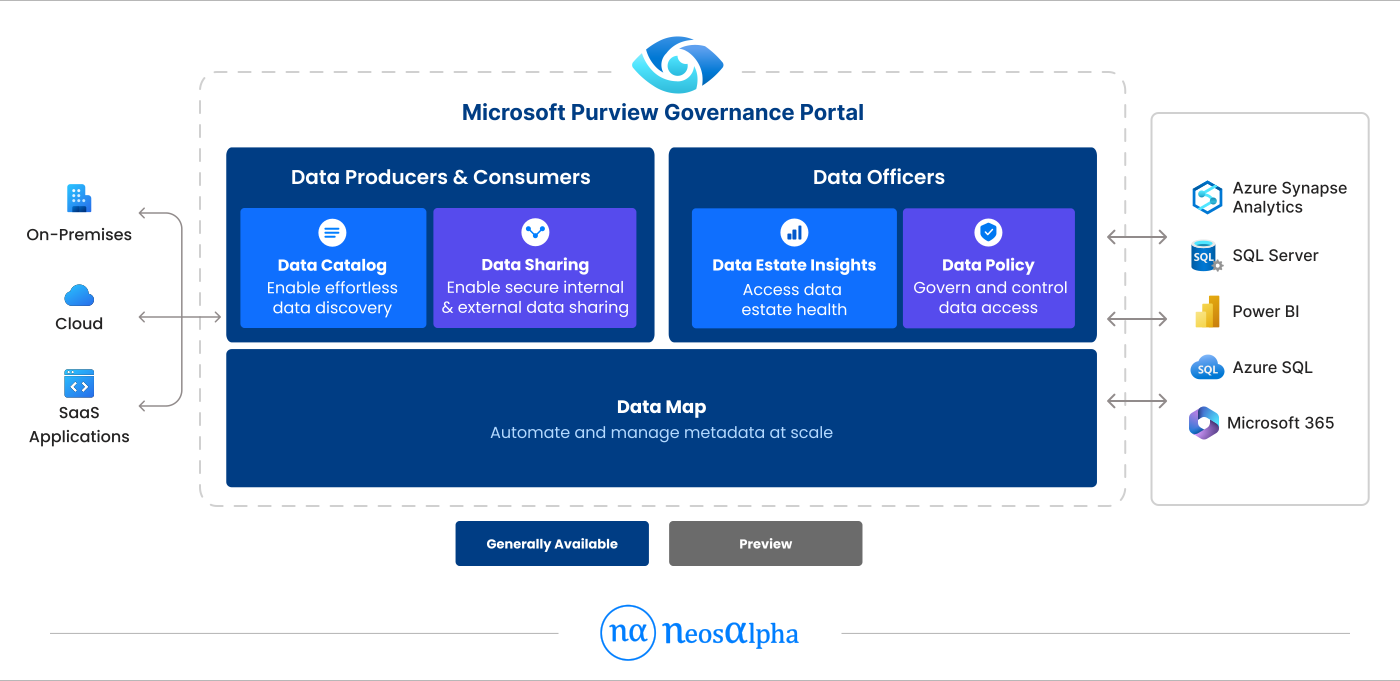
1. The Data Map
The Purview Data Map is the metadata backbone of the governance platform. It works by running automated scans against registered data sources, extracting schema information, technical metadata, and applying classification rules to identify sensitive data patterns (credit card numbers, passport numbers, healthcare identifiers, custom business-defined patterns, and hundreds of built-in types).
The Data Map supports an extensive range of sources: Azure Data Lake Storage, Azure SQL Database, Azure Synapse Analytics, Azure Cosmos DB, Amazon S3, Google Cloud Storage, on-premises SQL Server, SAP ECC, SAP S/4HANA, Salesforce, Power BI, Hive, and many more. Data stays in place: the scan reads metadata and samples; it does not copy or move data.
A key technical feature of the Data Map is automated data lineage. For supported sources and tools (including Azure Data Factory, Azure Synapse pipelines, and Microsoft Fabric), Purview automatically captures lineage: which datasets feed which transformations, which reports are built from which tables, and which downstream assets are affected when a source changes. This lineage is queryable and visualizable, enabling impact analysis for schema changes, data quality investigations, and regulatory audits.
2. Unified Catalog and Data Products
The Unified Catalog is the consumer-facing interface built on top of the Data Map. It provides a curated, searchable repository of all data assets in the organization, organized by governance domains (business-aligned organizational units) and data products (grouped collections of related data assets packaged for specific use cases).
The data product concept is a significant evolution from traditional data catalog approaches. Rather than presenting raw tables and files to users, data products group related assets under a business context. A Customer 360 data product, for example, might include CRM tables, transaction history files, and marketing segmentation datasets. Users request access to the product rather than to fifteen individual tables, dramatically simplifying governance administration.
Glossary terms in the Unified Catalog have evolved from static descriptors to active governance objects. A glossary term can now carry attached policies that automatically apply access rules, sensitivity labels, and data quality requirements to every asset tagged with that term — scaling governance from manual asset-by-asset configuration to policy-driven automation.
Data quality scoring is integrated directly into the catalog. No-code and low-code quality rules (including AI-generated rules) are applied at the column level, aggregated to asset, product, and domain levels, and surfaced as quality scores alongside each data asset, so users understand the reliability of data before they use it.
| Technical Note: Data Quality Rules Purview supports out-of-the-box quality rules (null checks, uniqueness, format validation, range checks) and AI-generated rules derived from data profiling. Rules execute within a Microsoft Managed Virtual Network connecting privately to your Azure data sources, keeping data within your residency boundary. Results are stored encrypted in the same region as the source. |
Microsoft Purview Information Protection
Information Protection in Microsoft Purview centers on sensitivity labels: metadata tags applied to content (documents, emails, meetings, calendar items, Teams messages, and cloud data) that define how that content should be handled, protected, and shared.

1. Sensitivity Labels and Classification
Sensitivity labels are created in the Microsoft Purview compliance portal and are applied to content either manually by users or automatically through classification policies. Auto-labeling policies use trainable classifiers, exact data match (EDM) patterns, and keyword-based rules to detect sensitive content and apply the appropriate label without requiring user action.
Labels can enforce a range of protective actions: visual markings (headers, footers, watermarks), encryption via Azure Rights Management (restricting who can open, edit, copy, or print the content), access controls that persist even when content is shared externally, and data handling requirements that flow into DLP and retention policies.
Critically, sensitivity labels are persistent. A label applied to a Word document travels with it wherever it goes: whether it’s emailed to a partner, uploaded to SharePoint, downloaded to a personal device, or opened in a third-party application. The encryption and access controls remain active. This persistence is what makes sensitivity labels the foundational control in any enterprise information protection architecture.
2. Sensitivity Labels for Microsoft Copilot and AI
With the rise of Microsoft Copilot and generative AI tools in the enterprise, Purview’s information protection has been extended to govern AI interactions. If a file is labeled with a sensitivity label that applies encryption, Microsoft Copilot respects those access controls: it cannot summarize content the user does not have permission to view. Organizations can also use Purview DLP policies to prevent labeled content from surfacing in Copilot responses, providing an additional layer of AI governance aligned with data classification.
Data Loss Prevention (DLP) in Microsoft Purview
Data Loss Prevention in Microsoft Purview is a policy engine that identifies sensitive information and enforces controls to prevent its unauthorized sharing or exfiltration. DLP policies can operate across a wide range of locations:
- Exchange Online (email)
- SharePoint Online and OneDrive for Business
- Microsoft Teams (chat messages and files)
- Endpoints (Windows and macOS devices enrolled in Defender for Endpoint)
- Cloud apps via Microsoft Defender for Cloud Apps
- Network traffic (Network DLP)
- Microsoft 365 Copilot and third-party AI tools accessed via browser
DLP uses deep content inspection and contextual analysis to identify sensitive data patterns. Detection methods include sensitive information types (built-in patterns like credit card numbers, NHS numbers, and passport data), trainable classifiers (ML models trained on document types), exact data match (EDM, which matches against specific data values in a reference dataset), and fingerprinting (which detects derivatives of specific documents).
When DLP detects a policy violation, it can respond with a range of actions: warn the user with policy tips, block the sharing action outright, encrypt the content before transmission, quarantine the item, or send an alert to a compliance administrator. For endpoint DLP, actions include blocking file uploads to unmanaged cloud storage, restricting copy-paste from sensitive files to unmanaged apps, and blocking printing of sensitive documents.
Insider Risk Management and Communication Compliance
Insider threats are among the most difficult security challenges for enterprises: malicious or negligent actions by employees, contractors, or partners who already have legitimate access to systems. Microsoft Purview Insider Risk Management addresses this through behavioral analytics rather than purely policy-based controls.
Insider Risk Management correlates signals from across the Microsoft 365 environment: file download and sharing patterns, departing-employee indicators from HR system integrations, access to sensitive labels, use of unauthorized cloud storage, and anomalous printing or copying activity. Machine learning models build a risk profile for each user, generating risk scores and surfacing alerts for the activities that deviate most significantly from established baselines.
Insider Risk Management has been extended to cover agentic risk: Microsoft Purview can now detect and flag when AI agents (first-party, third-party, or custom-built agents running in Microsoft environments) exhibit behaviors such as unauthorized data access or policy violations, providing visibility into a new category of insider risk that did not exist in traditional deployments.
Communication Compliance monitors internal and external communications (email, Teams, Yammer) for policy violations, including inappropriate language, sharing sensitive data in chat, potential conflicts of interest, and regulatory compliance issues in financial services communications. Policies use both keyword matching and trainable classifiers to surface relevant messages for human review, with privacy controls that protect reviewer identity and support a multi-reviewer workflow.
eDiscovery and Audit in Microsoft Purview
1. eDiscovery
Microsoft Purview eDiscovery provides legal teams and compliance officers with tools to identify, preserve, collect, review, and export electronically stored information (ESI) in response to litigation, regulatory investigations, or internal inquiries. The platform supports the full EDRM (Electronic Discovery Reference Model) workflow within a single interface.
eDiscovery operates across Exchange Online (mailboxes and archive mailboxes), SharePoint Online, OneDrive for Business, Microsoft Teams (chat messages and channel posts), Microsoft 365 Groups, and Viva Engage. Legal hold preserves content in place without user notification, preventing deletion or modification. Content search uses keyword queries, date filters, participant filters, and message type conditions to identify relevant content.
Premium eDiscovery adds advanced analytics: near-duplicate detection, email thread analysis, machine learning-based relevance scoring, and review sets that allow custodian tagging, annotating, and redacting content before export. These capabilities significantly reduce review volumes, which is directly relevant to litigation cost management.
Importantly, eDiscovery in Purview now covers AI interactions. User prompts to and responses from Microsoft Copilot are stored in the user’s mailbox, are searchable, and can be retained via eDiscovery, enabling organizations to meet regulatory obligations regarding AI-generated content.
2. Audit
The Microsoft Purview Audit solution provides comprehensive logging of user and administrator activities across Microsoft 365 services. Standard Audit (available in E3) retains audit logs for 180 days. Premium Audit (available in E5) extends retention to one year by default and up to ten years with additional add-ons, and includes additional high-value audit events relevant to forensic investigations.
Premium Audit also provides intelligent insights: bandwidth access events that indicate when large volumes of items are read (which could indicate data harvesting), mail items accessed and sent events for investigating compromised accounts, and search query terms for SharePoint and Exchange that surface what information users were looking for. These signals support both security investigations and compliance audit trails.
3. Compliance Manager
Compliance Manager is Microsoft Purview’s assessment and tracking tool for regulatory compliance. It provides organizations with a compliance score: a quantified measure of how well the current environment meets the requirements of selected regulatory frameworks.
Compliance Manager maps Microsoft control implementations (the configurations and policies in place across Microsoft 365, Azure, and Purview) to the requirements of over 360 regulatory templates, including GDPR, ISO 27001:2022, HIPAA, SOC 2, PCI DSS, NIST 800-53, and sector-specific frameworks for financial services, healthcare, and government.
For each regulation, the Compliance Manager identifies which controls are automatically managed by Microsoft (covered by the Microsoft service agreement), which require customer configuration, and which require customer documentation. Improvement actions provide step-by-step guidance, evidence for implementation, and testing instructions. Actions can be assigned to owners, given due dates, and tracked through to completion, making Compliance Manager a practical operational tool rather than just an assessment dashboard.
Microsoft Purview: Feature Reference Table
| Capability | What It Does | Key Personas | License Tier |
|---|---|---|---|
| Data Map | Scans 200+ sources, captures metadata, classifications, lineage | Data architects, data stewards | Purview Enterprise |
| Unified Catalog | Searchable data catalog with data products, glossary, and quality scores | Data consumers, stewards, owners | Purview Enterprise |
| Information Protection | Sensitivity labels, encryption, rights management | Compliance officers, security teams | M365 E3 / E5 |
| Data Loss Prevention | Policy enforcement to prevent sensitive data sharing or exfiltration | Compliance officers, CISO | M365 E3 / E5 |
| Insider Risk Management | Behavioral analytics to detect internal threat indicators | Security operations, HR, legal | M365 E5 / E5 Compliance |
| Communication Compliance | Monitors communications for regulatory violations | Compliance officers, legal teams | M365 E5 / E5 Compliance |
| eDiscovery (Standard) | Legal hold, content search, export | Legal teams, compliance | M365 E3 |
| eDiscovery (Premium) | Advanced analytics, review sets, and custodian management | Legal teams, litigation support | M365 E5 |
| Audit (Standard) | 180-day audit log retention | Security, compliance teams | M365 E3 |
| Audit (Premium) | 1-year retention, high-value events, forensic insights | Security operations, legal | M365 E5 |
| Compliance Manager | 360+ regulatory templates, compliance score, improvement actions | Compliance officers, risk teams | Included with M365 |
Microsoft Purview and Microsoft Fabric
For organizations using Microsoft Fabric for analytics, Purview is the governance backbone that makes Fabric enterprise-ready. The integration between the two platforms operates at multiple levels:
- Sensitivity labels applied in Purview automatically propagate to Fabric datasets, reports, and lakehouses. A label applied to source data flows downstream through Fabric pipelines to output reports and exports without manual re-labeling.
- Data lineage tracked by Fabric (through Data Factory and Synapse pipelines) is automatically published to the Purview Data Map, giving compliance teams full visibility into how data flows from source systems through transformation to analytics output.
- The Purview Unified Catalog scans Fabric workspaces and registers Power BI datasets, Lakehouses, and Warehouses as cataloged assets, making them discoverable and governable alongside other enterprise data sources.
- Access policies configured in Purview can govern access to Fabric data products, enabling centralized access management across both the analytics and governance platforms.
This integration means organizations do not need to choose between a powerful analytics platform and robust governance. Fabric and Purview are designed to be deployed together, with governance flowing automatically as analytics assets are created and used.
Microsoft Purview for AI Governance
Perhaps the most significant recent development in Microsoft Purview is its expansion into AI governance. As enterprises deploy Microsoft Copilot, third-party AI tools, and custom-built agents, Purview provides the governance and compliance controls that align AI use with enterprise policy and regulatory requirements.
Purview for Agent 365, introduced in 2025, extends the full Purview governance stack to cover AI agents: first-party Microsoft agents, third-party agents, and custom agents built on Azure AI Foundry or the Microsoft 365 SDK. Organizations can assign risk levels to agents, receive AI Observability alerts when agents exhibit unexpected behaviors, and apply DLP and Information Protection controls that prevent agents from accessing or transmitting labeled sensitive data beyond their permitted scope.
Communication Compliance, Audit, Data Lifecycle Management, and eDiscovery have all been extended to cover human-agent interactions, enabling organizations to meet emerging regulatory requirements around AI-generated content and AI decision support in regulated processes.
For organizations navigating the compliance implications of AI deployment, Compliance Manager provides regulatory templates aligned with AI governance frameworks, including the EU AI Act and the NIST AI Risk Management Framework, along with improvement actions to guide technical and operational controls.
Modernize Data Governance with Microsoft Purview Across Hybrid and Multi-Cloud Environments
Implement automated data discovery, metadata management, lineage tracking, and compliance controls with Microsoft Purview for a unified governance framework.
Get Started NowMicrosoft Purview vs Azure Purview: Understanding the History
A common source of confusion is the relationship between Microsoft Purview and Azure Purview. Azure Purview was Microsoft’s standalone data governance product launched in 2021. In April 2022, Microsoft rebranded Azure Purview and merged it with Microsoft 365 Compliance under the unified name Microsoft Purview.
Technically, the data governance capabilities (Data Map, data catalog, lineage) that were Azure Purview still exist within Microsoft Purview, accessed through the same APIs and the Microsoft Purview governance portal. Organizations that were using Azure Purview do not lose capabilities; they gain additional integration with the compliance and security solutions now part of the same platform.
| Terminology Clarification There is no product called Azure Purview anymore. It is now Microsoft Purview. The data governance capabilities (Data Map, Unified Catalog) are accessed via the Microsoft Purview portal. The compliance capabilities (DLP, eDiscovery, IRM, etc.) are accessed via the Microsoft Purview compliance portal. Both portals are part of the same platform. |
Microsoft Purview Licensing: What You Need to Know
Purview licensing is split across two categories that reflect its dual nature: data governance and data security and compliance.
1. Data Governance Licensing
Purview data governance capabilities (Unified Catalog and Data Map) are licensed via a Microsoft Purview Enterprise account, formerly billed under Azure Purview consumption-based pricing. Scans consume capacity units based on the number of data assets scanned. A free tier allows limited scanning for evaluation purposes. Enterprise licensing unlocks full capacity for production deployments.
2. Data Security and Compliance Licensing
Purview compliance capabilities are licensed as part of Microsoft 365 licensing tiers:
- Microsoft 365 E3: Includes Information Protection (sensitivity labels), standard DLP (Exchange, SharePoint, OneDrive), standard Audit (180 days), and standard eDiscovery
- Microsoft 365 E5 or E5 Compliance: Adds premium DLP (Teams chat, endpoint, cloud apps), Insider Risk Management, Communication Compliance, Premium Audit (1-year retention, high-value events), and Premium eDiscovery (advanced analytics)
- Microsoft 365 E5 Information Protection and Governance, E5 eDiscovery and Audit, E5 Insider Risk Management: Modular add-ons for organizations on E3 that want specific E5 capabilities without the full E5 upgrade
- Microsoft Purview Suite for Business Premium: Bundled AI-powered compliance for SMBs (up to 300 users), covering Information Protection, DLP, eDiscovery Premium, Insider Risk Management, Audit Premium, and Communication Compliance
| Licensing Tip DLP for Teams chat messages (not just files) requires E5 or E5 Compliance licensing. Standard E3 DLP protects files shared in Teams (stored in SharePoint/OneDrive) but does not inspect Teams chat messages. This is one of the most common misconfiguration risks in enterprise Purview deployments. |
Who Should Use Microsoft Purview?
Microsoft Purview addresses the needs of several distinct organizational roles:
| Role | Primary Purview Use Cases |
|---|---|
| Chief Data Officer (CDO) | Data strategy, unified catalog, governance domain management, data quality visibility |
| Chief Information Security Officer (CISO) | Information protection, DLP, insider risk management, AI governance |
| Compliance Officer | eDiscovery, audit, Compliance Manager, regulatory assessments, communication compliance |
| Data Architect | Data Map, lineage, source registration, Fabric integration, metadata management |
| Data Steward | Catalog curation, glossary management, quality rule configuration, access request workflows |
| Data Consumer / Analyst | Discovering trusted data products, requesting access, understanding lineage and quality |
| Legal Team | eDiscovery case management, legal hold, content export, AI interaction preservation |
| IT Administrator | Policy configuration, scan management, sensitivity label deployment, endpoint DLP |
How to Get Started with Microsoft Purview
A well-structured Purview implementation follows a phased approach aligned to the platform’s two solution families:
- Governance Foundation: Register your highest-priority data sources with the Purview Data Map and run initial scans. Review auto-classification results and tune classification rules. Establish governance domains aligned to business units.
- Catalog Curation: Define glossary terms and attach policies. Create data products for your most-used datasets. Set up access request workflows for each governance domain.
- Information Protection: Define your sensitivity label taxonomy. Deploy labels to Microsoft 365 services. Configure auto-labeling policies for high-priority sensitive data types. Test label inheritance behavior across services.
- DLP Deployment: Start with audit-only policies across Exchange, SharePoint, and OneDrive. Review policy match alerts; tune false-positive rates. Progressively enable enforcement (warn, then block), starting with the most sensitive label tiers.
- Compliance and Risk: Configure Compliance Manager with your primary regulatory frameworks. Assign improvement actions to owners. Enable Insider Risk Management policies for your highest-risk scenarios (departing employees, data exfiltration indicators).
- AI Governance: Configure Purview for Agent 365 if deploying Microsoft Copilot or custom agents. Define agent risk levels. Extend DLP and communication compliance to cover AI interactions.
How NeosAlpha Helps Organizations Implement Microsoft Purview
Implementing Microsoft Purview at enterprise scale requires more than portal configuration. It requires a clear data governance strategy, a realistic phasing plan, a well-designed sensitivity label taxonomy, integration of the governance and compliance solution families, and organizational change management to engage business teams with the catalog.
NeosAlpha is a Microsoft data and analytics partner with deep expertise across the Microsoft Purview platform. Our Purview services include:
- Purview Readiness Assessments: Evaluating your current data governance maturity, compliance posture, and Microsoft 365 licensing to define the right Purview adoption path
- Governance Architecture Design: Designing governance domains, data product structures, glossary frameworks, and access policy models aligned to your organizational structure
- Data Map Implementation: Registering and scanning your data sources, configuring classification rules, and establishing lineage tracking across Azure, on-premises, and multi-cloud environments
- Sensitivity Label Taxonomy Design: Designing, documenting, and deploying a sensitivity label structure that meets both information protection and regulatory requirements
- DLP Policy Design and Deployment: Building a policy framework that reduces data loss risk without disrupting legitimate business workflows
- Compliance Manager Configuration: Setting up regulatory templates, assigning improvement actions, and establishing compliance reporting processes
- Microsoft Fabric and Purview Integration: Configuring the Fabric-Purview governance integration for organizations using both platforms
- Training and Enablement: Upskilling data owners, stewards, compliance officers, and IT administrators on the Purview platform operations
Conclusion
Microsoft Purview is one of the most comprehensive data governance and compliance platforms available to enterprise organizations operating within the Microsoft ecosystem. By unifying data cataloging, classification, lineage, information protection, DLP, insider risk, eDiscovery, audit, and compliance management under a single platform, Purview eliminates the governance gaps that arise from deploying disconnected point solutions for each function.
The platform has matured significantly since its 2022 rebrand, with deep integration into Microsoft Fabric, comprehensive AI governance capabilities for Copilot and agent deployments, and extensions into network-level DLP and agentic risk management, reflecting the realities of enterprise data environments.
For organizations navigating complex data estates, growing regulatory requirements, and the governance challenges of AI adoption, Microsoft Purview is not a nice-to-have addition to the stack. It is increasingly the foundation that makes the rest of the data platform both trustworthy and compliant.
The question for most organizations is not whether to adopt Purview, but how to adopt it effectively and in the right sequence. That is precisely where NeosAlpha can help.

